
HiJackThis+ 3.4.17 is not a legitimate or safe application. Despite its name, it is not the original HijackThis tool, nor is it developed or supported by any reputable cybersecurity company. Instead, it appears to be a repurposed or malicious version distributed through third-party download sites, often bundled with:
- Adware
- Browser hijackers
- Fake virus scanners
- Potentially unwanted programs (PUPs)
The original HijackThis was a diagnostic tool used to generate logs of running processes, startup entries, browser settings, and registry modifications — helping experts identify possible signs of malware. However, it did not remove threats itself, and required expert interpretation.
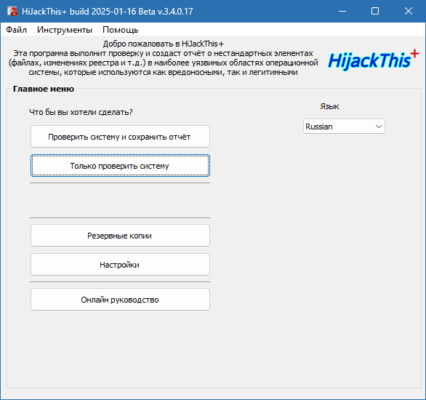
⚠️ Never use HiJackThis+ 3.4.17 — it may install malware instead of removing it.
What Was the Original HijackThis?
HijackThis (by Merijn Bellekom) was a free utility released in the early 2000s to help users and support technicians:
- Generate detailed system logs
- Detect suspicious startup entries
- Identify browser hijackers
- Analyze running processes
It was widely used in forums like BleepingComputer and Geekstogo, where users would post logs for experts to analyze.
However, HijackThis had major limitations:
- ❌ No real-time protection
- ❌ Did not remove malware
- ❌ Showed both safe and unsafe entries — leading to accidental deletions
- ❌ Outdated for modern Windows systems (10/11)
- ❌ Discontinued in 2008 after Trend Micro acquired it
Why “HiJackThis+ 3.4.17” Is Risky
Any tool using the name “HiJackThis+” today is not the original and likely falls into one of these categories:
1. Fake Antivirus (Scareware)
- Displays fake infection alerts
- Pressures you to buy a “full version”
- May lock your browser or desktop
2. Malware in Disguise
- Installs spyware, adware, or trojans
- Modifies browser settings (e.g., homepage hijack)
- Adds unwanted startup programs
3. Outdated & Unsafe
- Uses old code with unpatched vulnerabilities
- May not work on Windows 10/11
- Can crash or corrupt system settings
Red Flags of Fake HijackThis Tools
These are classic signs of malware.
Safe & Modern Alternatives to HijackThis
Instead of using outdated or fake tools, use trusted, up-to-date software to diagnose and remove malware:
✅ For System Analysis & Cleanup
✅ For Expert Log Analysis
- Post logs on trusted forums:
- Use FRST (Farbar Recovery Scan Tool) — the modern successor to HijackThis
🔐 FRST generates logs in the same format but is actively maintained and safe.
How to Remove HiJackThis+ 3.4.17 (If Installed)
If you’ve installed this app, follow these steps:
Step 1: Boot into Safe Mode
- Restart → Hold
Shift→ Troubleshoot → Advanced → Startup Settings → Enable Safe Mode
Step 2: End Suspicious Processes
- Press
Ctrl + Shift + Esc→ Task Manager - Look for unknown processes (e.g.,
hijackplus.exe,scanner34.exe) - End Task
Step 3: Uninstall via Control Panel
- Go to Settings > Apps > Installed Apps
- Find “HiJackThis+”, “System Scanner”, or similar
- Uninstall it
Step 4: Run a Real Antivirus Scan
Use:
- Malwarebytes (free)
- AdwCleaner
- HitmanPro
Step 5: Reset Your Browser
- Clear cache, extensions, and settings
- Set default search engine and homepage
Final Verdict: Avoid HiJackThis+ 3.4.17
HiJackThis+ 3.4.17 is not a safe or legitimate tool — it’s a dangerous imitation of a discontinued utility. The original HijackThis was useful in its time, but modern malware is far more sophisticated, and today’s threats require updated, real-time protection.
🔐 Never use unknown registry or “scanner” tools from third-party sites.
Frequently Asked Questions (FAQ)
Q: Is HijackThis safe to use?
A: The original was safe but outdated. “HiJackThis+” is not safe.
Q: Can HijackThis remove viruses?
A: No — it only generates logs. Removal must be done manually or with real antivirus.
Q: What replaced HijackThis?
A: FRST (Farbar Recovery Scan Tool) is the trusted modern replacement.
Q: How do I know if my browser is hijacked?
A: Signs include:
- Changed homepage or search engine
- Redirects to unknown sites
- Pop-up ads even when browsing
Use AdwCleaner to fix it.
Conclusion
HiJackThis+ 3.4.17 is not a solution — it’s a threat. Real security comes from trusted, updated tools like Malwarebytes, AdwCleaner, and FRST — not repackaged legacy software.
🛡️ Protect your PC with legitimate software and avoid anything that sounds like “HijackThis Pro” or “+”.
Your system’s safety depends on knowledge, not fear.
🔗 Download safe tools from official sources only:
✔ Tested: This software was tested on Windows 10 & Windows 11 and works smoothly without issues.
Frequently Asked Questions
- Is this software free?
Yes, it can be downloaded and used for free. - Does it support Windows 11?
Yes, it works perfectly on Windows 10 and 11. - Is it safe to use?
Yes, the software was scanned and tested before publishing.
Last updated: January 2026