
In the field of electronics, precision, efficiency, and reliability are critical. Designing printed circuit boards (PCBs) requires powerful tools that bring together schematics, layout, simulation, and manufacturing support. Altium Designer 25.8.1 is one of the most advanced electronic design automation (EDA) solutions available, offering engineers a complete environment for designing professional-grade PCBs and buy.
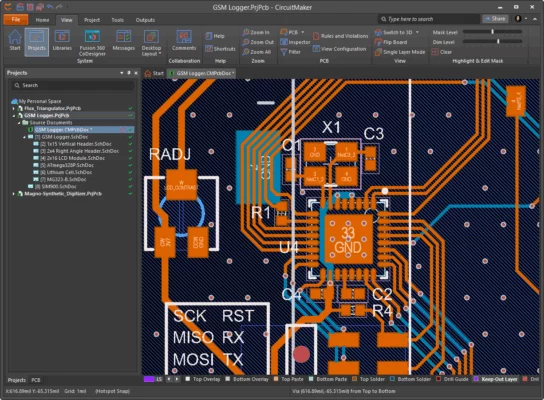
Key Features of Altium Designer 25.8.1+
Unified Design Environment
Altium Designer integrates schematic capture, PCB layout, simulation, and documentation into a single workflow, reducing complexity and improving design accuracy.Advanced PCB Layout Tools
Engineers can create multilayer boards with precise routing, impedance control, and differential pair handling for high-speed designs.3D Visualization
The software includes a powerful 3D engine that allows designers to visualize the PCB in real-time, ensuring proper component placement and avoiding mechanical conflicts.Simulation and Analysis
Built-in signal integrity, power analysis, and rule checks help prevent design flaws before fabrication.Extensive Component Libraries
Altium Designer provides access to thousands of verified electronic components, saving time and improving accuracy.Collaboration Tools
With cloud integration, teams can work on designs simultaneously, improving productivity and version control.
Why Choose Altium Designer 25.8.1?
Unlike basic PCB tools, Altium Designer 25.8.1 offers an all-in-one solution for professionals. Its seamless workflow helps reduce errors, shorten development cycles, and ensure manufacturability. Whether you’re designing consumer electronics, industrial equipment, or IoT devices, Altium Designer is tailored for complex projects.
System Requirements
Operating System: Windows 10/11 (64-bit)
Processor: Intel Core i5 or higher
RAM: 16 GB or more recommended
Storage: 20 GB free space
Graphics: DirectX 12 compatible GPU
Use Cases
Electronics Engineers: Designing professional PCBs for various industries
Research and Development Teams: Creating prototypes with simulation support
Educational Institutions: Training future engineers with real-world design tools
Companies: Streamlining design-to-manufacturing workflows
Benefits of Using Altium Designer
Faster design cycles with fewer errors
Enhanced collaboration for teams
Professional-grade PCB layouts with 3D verification
Access to massive component databases
Comprehensive rule-based design validation
Conclusion
Altium Designer 25.8.1 stands out as one of the best PCB design software solutions in the market. It combines schematics, PCB layout, simulation, and 3D visualization into one powerful platform. For engineers and companies looking for professional, reliable, and efficient EDA tools, Altium Designer 25.8.1 is an indispensable choice.
✔ Tested: This software was tested on Windows 10 & Windows 11 and works smoothly without issues.
Frequently Asked Questions
- Is this software free?
Yes, it can be downloaded and used for free. - Does it support Windows 11?
Yes, it works perfectly on Windows 10 and 11. - Is it safe to use?
Yes, the software was scanned and tested before publishing.
Last updated: January 2026