TechSmith Camtasia 2023 is a powerful screen recording and video editing tool that combines simplicity with advanced features. Whether you are an educator, content creator, YouTuber, or corporate trainer, Camtasia allows you to produce high-quality videos quickly and efficiently. With its intuitive interface and built-in assets, even users with minimal experience can create professional-looking videos and buy.
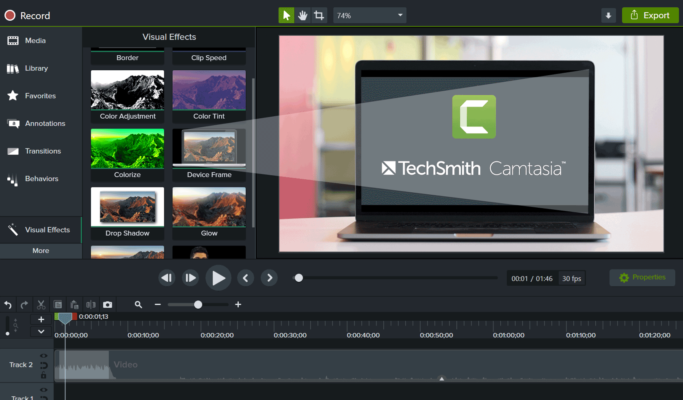
What’s New in Camtasia 2023?
Camtasia 2023 introduces several performance improvements and new features. One of the most notable additions is enhanced performance for 4K video editing, making it easier to work with high-resolution footage. The library has also been upgraded with new templates, intros, and transitions that save time and maintain a consistent look across all your content.
The Cursor Path Editing feature allows for precise control over cursor movement, making tutorials more engaging and easier to follow. Improved audio enhancements, such as noise removal and equalizer presets, ensure your voice is clear and professional.
Key Features
Screen Recording: Capture your screen in full HD or 4K, with options to include system audio, webcam, or microphone.
Video Editing: Timeline-based editor with drag-and-drop functionality, cut, trim, and combine clips with precision.
Templates & Presets: Built-in video templates and themes that streamline content creation.
Animations & Effects: Add transitions, callouts, text overlays, green screen effects, and motion graphics.
Audio Tools: Noise reduction, volume leveling, fade-in/fade-out, and background music integration.
Interactivity: Add quizzes and clickable links for eLearning and corporate training videos.
Export & Share: Export in MP4, AVI, MOV, and GIF formats, or upload directly to YouTube, Vimeo, or Google Drive.
Who Is Camtasia For?
Camtasia is ideal for a wide range of users:
Educators: Create engaging lecture videos and tutorials for online teaching platforms.
Marketers: Build professional product demos and explainer videos.
Content Creators: Produce YouTube videos with ease using intros, effects, and captions.
Businesses: Train employees through interactive training videos with quizzes.
System Requirements
OS: Windows 10 or later / macOS Monterey or later
RAM: 8 GB minimum (16 GB recommended)
CPU: 2.0 GHz quad-core processor
GPU: Dedicated graphics card for 4K editing
Storage: 4 GB free disk space
Final Thoughts
TechSmith Camtasia 2023 continues to lead the screen recording and editing market. Its balance between powerful features and user-friendly design makes it the go-to choice for individuals and professionals looking to create polished video content without a steep learning curve.
Whether you’re building online courses, recording software tutorials, or preparing business presentations, Camtasia provides all the tools you need in one platform.
✔ Tested: This software was tested on Windows 10 & Windows 11 and works smoothly without issues.
Frequently Asked Questions
- Is this software free?
Yes, it can be downloaded and used for free. - Does it support Windows 11?
Yes, it works perfectly on Windows 10 and 11. - Is it safe to use?
Yes, the software was scanned and tested before publishing.
Last updated: January 2026