When working with important documents like contracts, research papers, technical manuals, or regulatory filings, even the smallest change can have big consequences. Manually comparing two versions of a PDF file is time-consuming and error-prone — especially when changes are subtle or hidden in formatting and buy.
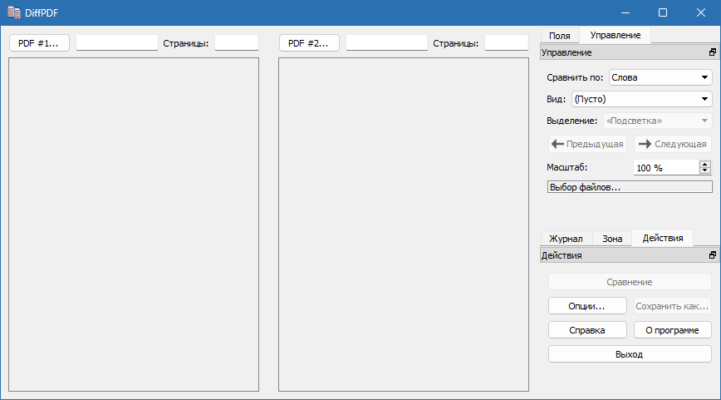
That’s where Qtrac DiffPDF 6.1.1 comes in — a professional-grade PDF comparison tool that automatically highlights differences between two PDF documents with exceptional accuracy.
Developed for precision and simplicity, DiffPDF 6.1.1 allows users to compare PDFs at both the textual level and the visual (appearance) level , making it an essential tool for lawyers, editors, engineers, academics, and quality assurance professionals.
Let’s explore what makes this software one of the most reliable solutions for detecting PDF changes.
📌 What Is Qtrac DiffPDF 6.1.1?
Qtrac DiffPDF 6.1.1 is a lightweight desktop application for Windows, macOS, and Linux that enables side-by-side comparison of two PDF files. Unlike basic tools that only check text content, DiffPDF gives you control over how comparisons are made:
- Text Mode: Compares actual text layer (ideal for spotting word changes).
- Appearance Mode: Compares visual rendering (detects font, layout, spacing, image shifts).
This dual-mode functionality ensures no difference goes unnoticed — whether it’s a changed number in a contract clause or a repositioned logo on a report cover.
It’s particularly useful when reviewing revised drafts, audit reports, or compliance documents where every detail matters.
🛠️ Key Features of Qtrac DiffPDF 6.1.1
1. 🔍 Accurate Text Comparison
Highlights added, deleted, or modified text across pages. Shows differences down to individual characters or words.
Perfect for:
- Contract revisions
- Academic edits
- Regulatory updates
2. 🖼️ Visual (Appearance-Based) Comparison
Compares the rendered output of each page as images — detects changes in:
- Fonts and sizes
- Margins and alignment
- Graphics, charts, and logos
- Page breaks and table layouts
Even if the underlying text hasn’t changed, visual shifts will be flagged.
3. 🔄 Side-by-Side View
View both PDFs simultaneously with color-coded highlights:
- Red = Deleted/changed content
- Green = Added content
Easy navigation between differing pages and sections.
4. 🧩 Compare Specific Pages or Ranges
You can limit the comparison to specific pages (e.g., compare only page 5–10), saving time on long documents.
5. 📁 Supports Encrypted & Secured PDFs
Open password-protected PDFs (if you have the password) and still perform full comparisons.
6. 💾 Export Comparison Results
Save the comparison report as a new PDF or HTML file for sharing or archiving.
Great for creating revision logs or audit trails.
7. ⚙️ Command-Line Version Available
For developers and IT teams, a console/command-line version is included — perfect for automation, batch processing, or integration into document management systems.
8. 🖥️ Cross-Platform Compatibility
Runs natively on:
- Windows
- macOS
- Linux
Ideal for organizations using mixed environments.
9. 🧼 Lightweight & Fast
Minimal resource usage with quick startup and responsive performance — works smoothly even on older machines.
10. 🆓 Free to Use (Open Source-Inspired)
While not fully open-source, DiffPDF has been distributed freely for years and remains a trusted tool without ads, watermarks, or subscriptions.
✅ Developed using Qt framework; known for stability and clean UI.
👥 Who Should Use Qtrac DiffPDF 6.1.1?
- Lawyers & Paralegals: Review contract revisions and track client changes.
- Editors & Publishers: Compare manuscript drafts before printing.
- Engineers & Designers: Check updated schematics or technical drawings.
- Academics & Researchers: Validate peer-reviewed paper edits.
- Compliance Officers: Ensure regulatory documents remain consistent.
- IT & QA Teams: Automate document validation processes.
🖥️ System Requirements
- Operating System: Windows 7+, macOS 10.12+, or Linux (64-bit)
- RAM: 2 GB minimum
- Hard Disk Space: 50 MB free space
- Supported PDF Versions: Up to PDF 1.7 (compatible with Adobe Acrobat XI)
📈 Why Choose Qtrac DiffPDF 6.1.1?
- ✅ Dual Comparison Modes (Text + Appearance)
- ✅ High Accuracy & Reliability
- ✅ Cross-Platform Support
- ✅ No Cost & No Ads
- ✅ Batch & CLI Support for Automation
- ✅ Trusted by Professionals Since Early 2000s
✅ Final Thoughts
Qtrac DiffPDF 6.1.1 may not look flashy, but it delivers exactly what professionals need: a fast, accurate, and dependable way to detect changes in PDF documents . Whether you’re verifying legal agreements or auditing technical reports, its ability to catch both textual and visual differences sets it apart from generic diff tools.
If you frequently work with multiple versions of PDFs and need confidence that nothing slips through the cracks, Qtrac DiffPDF 6.1.1 is a must-have utility .
For precision, simplicity, and zero cost, DiffPDF remains a quiet champion in the world of document comparison .
✔ Tested: This software was tested on Windows 10 & Windows 11 and works smoothly without issues.
Frequently Asked Questions
- Is this software free?
Yes, it can be downloaded and used for free. - Does it support Windows 11?
Yes, it works perfectly on Windows 10 and 11. - Is it safe to use?
Yes, the software was scanned and tested before publishing.
Last updated: January 2026