
Reverse engineering has become an essential skill in cybersecurity, malware research, and software development. Analysts, security researchers, and developers rely on advanced tools to understand how applications work, identify vulnerabilities, and ensure security compliance.
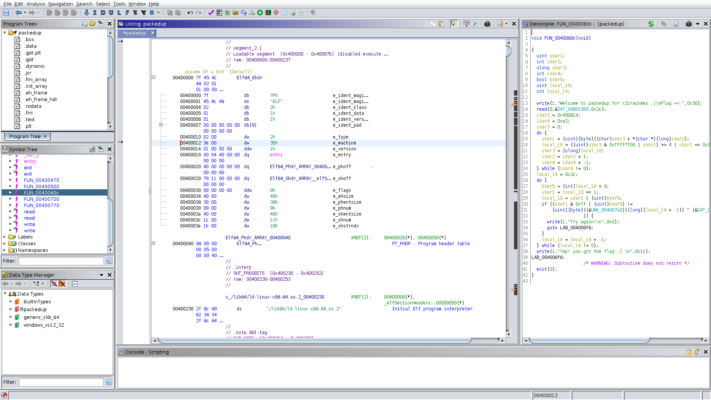
Ghidra 11.4.2, developed by the National Security Agency (NSA), is one of the most powerful and widely used software reverse engineering (SRE) frameworks. As an open-source tool, it provides researchers with an accessible yet robust environment for analyzing executable files across multiple platforms.
What is Ghidra?
Ghidra is a free reverse engineering tool that supports disassembly, decompilation, debugging, and static analysis of compiled code. It allows professionals to break down complex binaries, explore program behavior, and detect hidden vulnerabilities.
Unlike many commercial solutions, Ghidra is open-source and regularly updated by the NSA and the community, making it a strong alternative to paid reverse engineering tools.
Key Features of Ghidra 11.4.2
1. Multi-Platform Support
Works with Windows, macOS, and Linux.
Can analyze binaries from a wide range of architectures (x86, ARM, MIPS, PowerPC, etc.).
2. Disassembly and Decompilation
Translates machine code into a human-readable format.
High-level decompiler makes understanding code easier.
3. Debugging Capabilities
Debug applications in real-time.
Track memory usage, execution flow, and function calls.
4. Collaboration Features
Multiple users can work on the same project simultaneously.
Ideal for teams of researchers or analysts.
5. Extensibility
Built with a modular architecture.
Supports custom scripts and plugins via Python and Java.
What’s New in Version 11.4.2?
Improved Decompiler Accuracy – More precise translations for complex code.
UI Enhancements – Better navigation and smoother workflow.
Performance Optimizations – Faster analysis of large binaries.
Bug Fixes – Stability improvements for Windows and Linux environments.
Extended Architecture Support – Enhanced compatibility with additional instruction sets.
Benefits of Using Ghidra 11.4.2
For Cybersecurity Professionals
Identify vulnerabilities in software.
Reverse-engineer malware samples for threat analysis.
For Developers
Understand how compilers optimize code.
Audit applications for potential bugs or exploits.
For Researchers and Students
Free alternative to expensive reverse engineering suites.
Hands-on experience with professional-grade analysis tools.
How to Use Ghidra 11.4.2
Step 1: Install and Set Up
Download Ghidra from the official website and install it on your preferred platform.
Step 2: Import Binaries
Load executables, firmware, or libraries for analysis.
Step 3: Run Disassembly and Decompilation
Examine assembly instructions or view higher-level code through the decompiler.
Step 4: Debug and Analyze
Use the debugger to track execution, inspect memory, and analyze functions.
Step 5: Save and Share Results
Document findings and collaborate with other researchers using Ghidra’s shared project features.
Why Choose Ghidra Over Other Reverse Engineering Tools?
Many professionals compare Ghidra with tools like IDA Pro and Radare2. While IDA Pro is widely recognized, it is costly, whereas Ghidra is free, open-source, and highly extensible. It strikes a balance between usability, functionality, and accessibility, making it one of the best tools available for reverse engineering.
Conclusion
Ghidra 11.4.2 stands out as a powerful, free, and extensible reverse engineering platform that empowers professionals, researchers, and developers to analyze software effectively. With improved decompilation, debugging, and cross-platform compatibility, this version offers everything needed to investigate binaries, uncover vulnerabilities, and strengthen software security.
Whether you are a cybersecurity expert, a developer looking to improve code quality, or a student eager to learn reverse engineering, Ghidra 11.4.2 is a must-have tool in your toolkit.
✔ Tested: This software was tested on Windows 10 & Windows 11 and works smoothly without issues.
Frequently Asked Questions
- Is this software free?
Yes, it can be downloaded and used for free. - Does it support Windows 11?
Yes, it works perfectly on Windows 10 and 11. - Is it safe to use?
Yes, the software was scanned and tested before publishing.
Last updated: January 2026