In today’s digital workflow, the ability to convert between PDF and other document formats is essential. Whether you’re turning a scanned report into an editable Word file, converting a presentation to PDF, or extracting images from a manual, having a reliable conversion tool saves time and boosts productivity.
Enter Icecream PDF Converter 2.89 Pro — a sleek, user-friendly desktop application designed for both PDF-to-document and document-to-PDF conversions. Developed by Icecream Apps, this Pro version offers enhanced features over the free edition, including batch processing, higher output quality, no watermarks, and priority support .
Let’s explore why Icecream PDF Converter 2.89 Pro stands out as one of the best tools for seamless format conversion in 2025.
📌 What Is Icecream PDF Converter 2.89 Pro?
Icecream PDF Converter 2.89 Pro is a Windows-based software that allows users to:
- Convert PDF files into editable formats : DOCX (Word), XLSX (Excel), PPTX (PowerPoint), EPUB, HTML, TXT, and image formats (JPG, PNG, BMP, TIFF)
- Create high-quality PDFs from common file types including documents, spreadsheets, presentations, images, and web pages
Unlike online converters that require uploading sensitive files, the Pro version works offline , ensuring your data stays private and secure on your local machine.
It’s ideal for students, office workers, freelancers, and anyone who regularly handles multi-format documents.
🛠️ Key Features of Icecream PDF Converter 2.89 Pro
1. 🔁 Two-Way Conversion Support
Switch freely between formats:
- From PDF → Editable Files : Extract text and tables into Word, Excel, etc.
- To PDF → Universal Format : Combine documents, images, or web content into professional PDFs
Perfect for sharing, archiving, or submitting work.
2. 📦 Batch Processing
Convert multiple files at once — select entire folders and let the software process them automatically. Saves hours when dealing with large volumes of documents.
3. 🖼️ High-Fidelity Output
Preserves original formatting, fonts, layouts, and table structures during conversion — especially accurate for simple-to-moderate complexity documents.
4. 🧩 Wide Input/Output Format Support
Supports over 20 input formats , including:
.doc,.docx,.xls,.xlsx,.ppt,.pptx.jpg,.png,.bmp,.tiff,.html,.txt,.epub
And exports to all major PDF-compatible formats.
5. 🎯 Selective Page Conversion
When converting PDFs, choose specific page ranges instead of converting the entire file — great for extracting only relevant sections.
6. ⚙️ Customizable PDF Settings
Adjust PDF quality, page size, margins, and compression level when creating new PDFs.
Ideal for balancing file size and visual clarity.
7. 🖥️ No Internet Required
All processing happens locally — no need to upload files to cloud servers. Your confidential contracts, reports, or personal records remain completely private.
8. 🧼 Simple Drag-and-Drop Interface
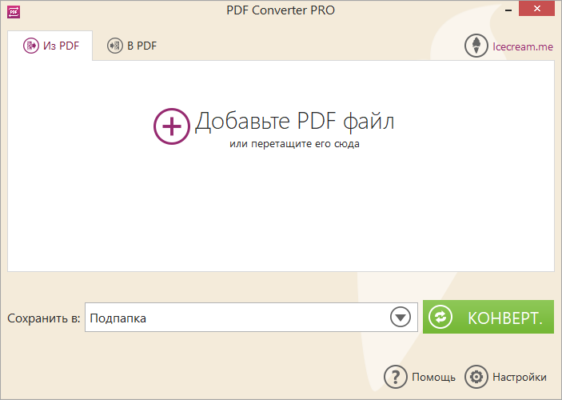
Just drag your files into the app window, set the output format, and click “Convert.” No technical skills needed.
9. 🔄 Retain Hyperlinks & Bookmarks
Keeps clickable links and internal navigation intact after conversion — useful for eBooks and interactive documents.
10. 💾 Lightweight & Fast
Small installation size (~50 MB), quick startup, and low system usage make it suitable even for older PCs.
👥 Who Should Use Icecream PDF Converter 2.89 Pro?
- Students: Convert lecture slides to editable notes or submit assignments as PDFs.
- Office Workers: Turn PDF invoices into Excel sheets or create polished reports.
- Freelancers: Deliver client-ready documents in any required format.
- Writers & Authors: Convert manuscripts between EPUB, DOCX, and PDF.
- Home Users: Combine photos into a single PDF album or extract text from scanned receipts.
🖥️ System Requirements
- Operating System: Windows 10 / 11 (64-bit recommended)
- RAM: 2 GB minimum (4 GB suggested)
- Hard Disk Space: 100 MB free space
- No .NET or Java Dependencies
- Administrator Rights: Required for installation
✅ Also available in portable mode — run directly from USB drive.
📈 Why Choose Icecream PDF Converter 2.89 Pro?
- ✅ Truly Offline Conversion = Maximum Privacy
- ✅ Fast Batch Processing for Efficiency
- ✅ No Watermarks or Ads (Unlike Free Version)
- ✅ Accurate Formatting Retention
- ✅ User-Friendly Design – Great for Beginners
- ✅ Affordable Alternative to Adobe Acrobat
✅ Final Thoughts
Icecream PDF Converter 2.89 Pro isn’t trying to replace full PDF editors — instead, it does one thing exceptionally well: format conversion made simple, fast, and secure .
With its clean interface, offline operation, and support for both directions (to and from PDF), it’s an indispensable tool for anyone who works across different file types daily.
If you’re tired of incompatible formats, broken layouts, or privacy concerns with online tools, Icecream PDF Converter 2.89 Pro delivers a smarter, safer solution .
For reliable, high-quality PDF conversion without hassle, this tool is definitely worth installing .
✔ Tested: This software was tested on Windows 10 & Windows 11 and works smoothly without issues.
Frequently Asked Questions
- Is this software free?
Yes, it can be downloaded and used for free. - Does it support Windows 11?
Yes, it works perfectly on Windows 10 and 11. - Is it safe to use?
Yes, the software was scanned and tested before publishing.
Last updated: January 2026