SyMenu 8.9.9363 is a free and versatile Windows utility that acts as a portable start menu and application launcher. It allows users to organize and quickly access all their portable apps, files, and documents from one unified interface. Perfect for USB drives or cloud folders, SyMenu eliminates the clutter of scattered shortcuts and gives you total control over your portable software environment.
Key Features
1. Portable Start Menu
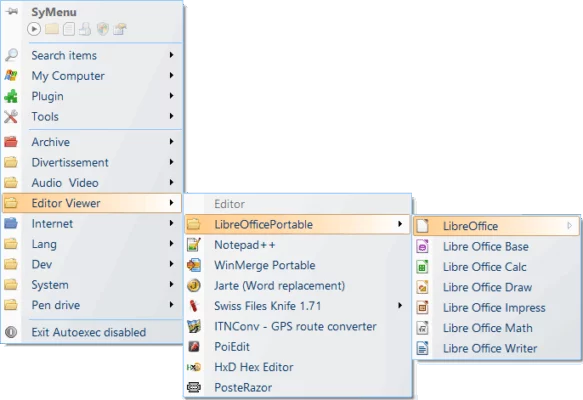
SyMenu turns any USB stick into a customizable start menu, enabling you to launch programs, documents, or commands without installing them on the host PC.
2. Automatic App Detection
The software automatically scans directories for portable apps, detects new ones, and adds them to your menu. This saves time when managing large collections of tools or utilities.
3. Integrated SPS Suite
With access to the SyMenu Suite (SPS), users can download, update, and manage hundreds of portable applications directly within the interface. SPS apps come from trusted sources and require no installation.
4. Full Customization
Customize icons, menu structure, themes, and categories according to your workflow. The drag-and-drop interface makes it easy to organize your apps in a way that feels intuitive.
5. Fast Search and Execution
The built-in search bar helps you find and run applications instantly, even if you have hundreds of items stored in your portable menu.
6. Lightweight and Efficient
SyMenu consumes minimal system resources and does not modify the Windows registry, ensuring safe use on any computer.
What’s New in Version 8.9.9363
The latest version includes improved performance, enhanced SPS catalog integration, and bug fixes that make the launcher more responsive. It also offers better handling of app icons and faster synchronization with external drives.
Benefits of Using SyMenu
Simplify Your Portable Workflow
Instead of manually searching for apps or creating desktop shortcuts, SyMenu centralizes everything into a single menu — perfect for developers, IT technicians, and on-the-go users.
Stay Organized Anywhere
Because SyMenu is portable, your personalized menu and settings travel with you, keeping your workspace consistent across different computers.
Safe and Reliable
Since it doesn’t require installation or admin rights, SyMenu ensures that your system remains clean and unaffected by changes.
Conclusion
SyMenu 8.9.9363 is an essential utility for anyone who regularly uses portable software. It offers an elegant, customizable, and efficient solution for managing apps on USB drives, external disks, or even cloud folders. With its seamless integration of the SyMenu Suite and user-friendly design, it remains one of the best tools for organizing and launching portable applications on Windows.
✔ Tested: This software was tested on Windows 10 & Windows 11 and works smoothly without issues.
Frequently Asked Questions
- Is this software free?
Yes, it can be downloaded and used for free. - Does it support Windows 11?
Yes, it works perfectly on Windows 10 and 11. - Is it safe to use?
Yes, the software was scanned and tested before publishing.
Last updated: January 2026