
WPS WPA Tester Premium 9.0.1 is an Android application that claims to analyze the security of nearby Wi-Fi networks by checking for WPS (Wi-Fi Protected Setup) vulnerabilities. It’s often marketed as a network diagnostic tool for advanced users, but it has gained notoriety due to misuse for unauthorized access attempts.
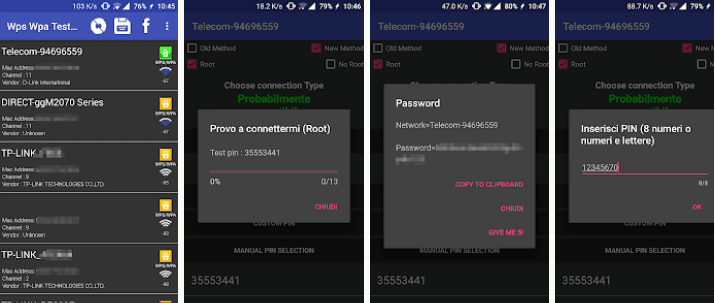
🔐 Clarification: This app does not “crack” passwords directly. Instead, it checks if a router is vulnerable to WPS brute-force attacks using known algorithms (like Pixie Dust attacks) — but only works on outdated, misconfigured routers.
Developed for educational and penetration testing purposes, it should only be used on networks you own or have explicit permission to test.
What Is WPS and Why Is It a Risk?
WPS (Wi-Fi Protected Setup) was introduced to simplify connecting devices to Wi-Fi without entering a password. It uses:
- Push-button method (WPS button on router)
- PIN method (8-digit code, often printed on router)
The Vulnerability
The 8-digit PIN is the weak point:
- It’s split into two parts (7 digits + 1 checksum), making it easy to brute-force
- Many older routers allow unlimited PIN attempts
- Tools like Reaver and PixieDust exploit this to recover the WPS PIN in hours — and thus the Wi-Fi password
⚠️ Note: Most modern routers (2015+) have patched these flaws or disabled WPS by default.
Key Features of WPS WPA Tester 9.0.1 [Premium]
1. Scan for WPS-Enabled Networks
Detects nearby routers with WPS enabled and shows:
- SSID
- MAC address
- Signal strength
- WPS status (locked, available, or unsupported)
2. Check for Vulnerability
Uses a database of known default PINs (based on router brand/model) to test if a network is at risk.
Example: Some older D-Link, TP-Link, or Huawei routers use predictable PINs (e.g., based on MAC address).
3. Pixie Dust Attack Integration
If the router is vulnerable, the app may attempt a Pixie Dust attack — an offline brute-force method that exploits weak random number generation in WPS.
- Works only on specific chipsets (e.g., Realtek, Ralink)
- Requires root and compatible Wi-Fi drivers (e.g., bcmon, custom kernel)
4. Root & Driver Support
Advanced features require:
- Root access
- Custom Wi-Fi drivers (e.g., bcmon, Nexmon) that allow packet injection
- No Google Play Store support – distributed via APK only
5. Premium Features (MOD Version)
The “Premium” or “Pro” APK typically includes:
- ✅ No ads
- ✅ Full PIN database
- ✅ Faster attack modes
- ✅ Export results
- ✅ Dark mode & improved UI
How It Works (Technically)
- Scan Wi-Fi networks using Android’s Wi-Fi manager
- Identify WPS-capable routers via beacon packets
- Attempt to connect using default or brute-forced PINs
- If successful, recover the WPA/WPA2 password
- Display the result (for educational use)
🛑 Most modern Android devices cannot perform packet injection, so full attacks are limited to rooted phones with special firmware.
Risks and Limitations
❌ Legality: Testing networks without permission is illegal
❌ Effectiveness: Over 90% of modern routers are immune
❌ Hardware Limits: Requires rooted device + special Wi-Fi chip
❌ Detection: Routers can lock after failed attempts
❌ Misuse: Often used in unethical hacking attempts
✅ Legitimate Uses:
- Testing your own home network
- Cybersecurity training
- Identifying weak devices in your environment
Legal & Ethical Guidelines
✅ You Can:
- Use it on your own router
- Teach network security in a lab environment
- Audit networks with written permission
❌ You Cannot:
- Access someone else’s Wi-Fi without consent
- Distribute recovered passwords
- Bypass security for malicious purposes
📚 This falls under ethical hacking — only legal when authorized.
Alternatives for Network Security Testing
These tools are safer, legal, and more practical for general use.
Final Thoughts
WPS WPA Tester Premium 9.0.1 APK is a niche tool rooted in cybersecurity research — not a magic “Wi-Fi hacker” app as often misrepresented online. While it highlights real vulnerabilities in outdated routers, its usefulness today is extremely limited due to widespread patches and hardware restrictions.
For average users, the best security practice is:
- 🔒 Disable WPS in your router settings
- 🔄 Update firmware regularly
- 📟 Use a strong WPA2/WPA3 password
Never attempt to access networks without permission. Stay curious, stay legal, and use technology responsibly.
🛡️ Security starts with awareness — not exploitation.
✔ Tested: This software was tested on Windows 10 & Windows 11 and works smoothly without issues.
Frequently Asked Questions
- Is this software free?
Yes, it can be downloaded and used for free. - Does it support Windows 11?
Yes, it works perfectly on Windows 10 and 11. - Is it safe to use?
Yes, the software was scanned and tested before publishing.
Last updated: January 2026