
Samsung smartphones and tablets dominate the Android ecosystem with millions of users worldwide. To keep these devices updated, fix boot issues, or install custom ROMs, users need a reliable flashing utility. Samsung Odin 3.14.4 is the official tool designed to flash stock firmware, recovery images, bootloaders, and custom binaries on Samsung devices.
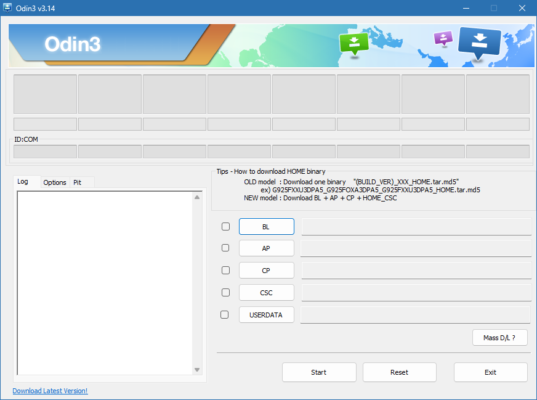
As the latest stable release, Odin 3.14.4 ensures compatibility with modern Samsung Galaxy devices and offers a safer flashing process for both advanced users and technicians.
What is Samsung Odin?
Odin is a Windows-based utility developed by Samsung, primarily used in service centers but widely available to the public. It allows users to communicate with Samsung devices in Download Mode, enabling the installation of official firmware files (*.tar or .tar.md5) and recovery packages.
This makes Odin invaluable for troubleshooting, restoring bricked devices, or customizing a phone with third-party ROMs.
Key Features of Samsung Odin 3.14.4
1. Flash Stock Firmware
Install official Samsung firmware to fix bugs, crashes, or boot loops.
Restore devices to factory settings for stability.
2. Custom ROM and Recovery Support
Flash TWRP recovery or custom ROMs for advanced customization.
Root Samsung devices by flashing patched boot images.
3. Compatibility with Latest Devices
Supports new Samsung Galaxy series including S, Note, and A models.
Works seamlessly with Android 10, 11, 12, and above.
4. Multiple Flashing Options
BL (Bootloader), AP (System/Recovery), CP (Modem/Radio), and CSC (Country/Carrier Settings) partitions supported.
Option to retain or wipe user data.
5. User-Friendly Interface
Simple layout with buttons for each partition.
Progress bar for tracking the flashing process.
What’s New in Odin 3.14.4?
Enhanced support for Android 12+ firmware.
Improved error handling during flashing.
Faster connection with Samsung devices in Download Mode.
Stability fixes for smoother operation.
Benefits of Using Odin 3.14.4
For Regular Users
Recover from software crashes or stuck boot screens.
Install the latest official updates without waiting for OTA rollout.
For Developers & Enthusiasts
Gain root access by flashing patched boot files.
Experiment with custom ROMs and kernels.
For Technicians
Repair soft-bricked Samsung phones.
Reinstall system firmware for troubleshooting.
How to Use Samsung Odin 3.14.4
Step 1: Preparation
Install Samsung USB drivers on your PC.
Download the correct firmware package for your device.
Enable Download Mode (Power + Volume Down + Home/Bixby).
Step 2: Load Files into Odin
Open Odin 3.14.4 on your PC.
Connect the device via USB cable.
Load firmware files into BL, AP, CP, and CSC slots as required.
Step 3: Start Flashing
Click Start to begin the flashing process.
Wait until the “PASS” message appears, indicating success.
Safety Tips
Always use the correct firmware version for your device model.
Ensure at least 50% battery before flashing.
Do not disconnect the USB cable during the process.
Why Choose Samsung Odin 3.14.4?
Compared to third-party flashing tools, Odin 3.14.4 is the official Samsung solution, offering:
Reliability – Designed specifically for Samsung devices.
Compatibility – Works with the latest Galaxy models.
Flexibility – Supports both stock and custom firmware.
Conclusion
Samsung Odin 3.14.4 is an essential tool for anyone working with Samsung devices. Whether you need to restore a malfunctioning phone, install custom recovery, or flash the latest firmware, Odin provides a fast and reliable solution.
By combining an easy-to-use interface with powerful flashing capabilities, Odin remains the go-to software for both beginners and professionals handling Samsung firmware.
✔ Tested: This software was tested on Windows 10 & Windows 11 and works smoothly without issues.
Frequently Asked Questions
- Is this software free?
Yes, it can be downloaded and used for free. - Does it support Windows 11?
Yes, it works perfectly on Windows 10 and 11. - Is it safe to use?
Yes, the software was scanned and tested before publishing.
Last updated: January 2026