Artweaver Plus 8.0.54.3181 Overview
Artweaver Plus 8.0.54.3181 is a professional digital painting and drawing software designed for artists who want to express their creativity with realistic tools and brushes. It offers a wide range of features for both beginners and professionals, providing a complete artistic environment that mimics traditional painting while integrating advanced digital editing capabilities.
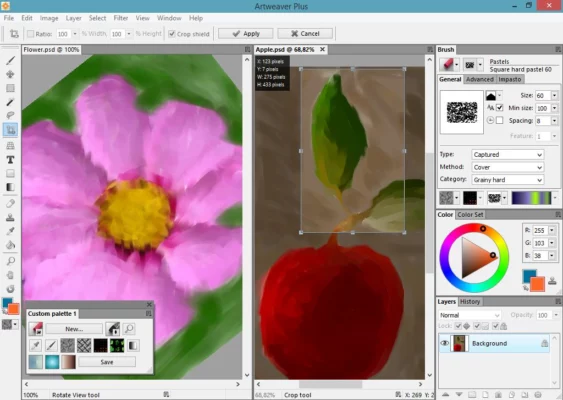
Whether you’re sketching, illustrating, or retouching photos, Artweaver Plus 8 gives you everything you need to create beautiful artwork on your computer.
Realistic Brushes and Natural Painting Experience
Artweaver Plus includes a comprehensive collection of realistic brushes that simulate pencils, chalk, charcoal, airbrushes, and oil paints. Each brush can be fully customized to achieve the perfect texture and style for your artwork.
The brush engine has been refined for smoother strokes and better pressure sensitivity, especially for those using graphics tablets. This makes painting in Artweaver feel incredibly natural and intuitive, replicating the look and feel of real-world tools.
Key Features of Artweaver Plus 8.0.54.3181
🎨 Extensive Brush Collection – Use realistic tools like pencils, oils, watercolors, and more.
🖼️ Layer Support – Work with multiple layers for complex image compositions.
⚙️ Customizable Interface – Personalize panels, colors, and shortcuts to suit your workflow.
📷 Photo Editing Tools – Adjust brightness, contrast, and apply artistic filters with precision.
🧠 Team Collaboration – Paint together in real time with other artists online.
🖋️ Tablet and Stylus Support – Perfect for Wacom and other pressure-sensitive devices.
💾 Multiple File Formats – Save and export in PSD, PNG, TIFF, or JPEG.
🧩 Plugin Support – Extend functionality with additional filters and effects.
User-Friendly Interface and Workflow
The interface of Artweaver Plus 8 is clean, modern, and fully customizable. Artists can arrange panels, choose dark or light themes, and assign shortcuts for faster access. The workflow is built to minimize distractions, allowing you to focus entirely on creativity.
You can also record your painting process and replay it later — a unique feature ideal for tutorials and showcasing your artistic techniques.
Performance and Compatibility
Artweaver Plus 8.0.54.3181 is lightweight yet powerful. It runs smoothly even on older systems while supporting the latest versions of Windows 10 and 11. The software uses hardware acceleration to enhance brush responsiveness and overall performance.
This ensures that every stroke feels immediate and fluid, no matter the complexity of your project.
Conclusion
Artweaver Plus 8.0.54.3181 combines artistic realism with modern technology, offering one of the best digital painting experiences on Windows. From professional illustrators to hobbyists, it provides an intuitive platform for creating expressive, high-quality digital art.
If you’re searching for a reliable and feature-rich painting software for Windows, Artweaver Plus 8 is an excellent choice for unleashing your creativity.
✔ Tested: This software was tested on Windows 10 & Windows 11 and works smoothly without issues.
Frequently Asked Questions
- Is this software free?
Yes, it can be downloaded and used for free. - Does it support Windows 11?
Yes, it works perfectly on Windows 10 and 11. - Is it safe to use?
Yes, the software was scanned and tested before publishing.
Last updated: January 2026