🧠 What Is WinToHDD?
WinToHDD is a Windows deployment tool enabling users to install, reinstall, or clone operating systems like Windows 7/8/10/11 or Server editions using ISO, WIM, ESD, VHD/VHDX files—without requiring USB, CD, or DVD media. It’s ideal for system deployment, cloning, or rescue tasks and buy.
🔍 Editions Comparison: Professional vs Enterprise
✅ Professional Edition
Licenses up to 2 PCs for individual or small home/business use.
Offers faster cloning, no upgrade reminders, lifetime free updates, and technical support.
Supports BitLocker partition encryption and GPT/UEFI installations.
✅ Enterprise Edition
Designed for organizational use with unlimited machine licensing at one site.
Includes all Professional features plus support for Windows Server editions.
Ideal for IT teams managing multiple deployments or cloning setups across networks.
✳️ What’s New in Version 6.6.1
Improved stability and compatibility when installing from ISO/WIM/ESD across both BIOS & UEFI systems.
Enhanced clone performance and reduced errors during system migration.
Fixed issues related to USB drive creation failures while building WinPE environments for installation.
Added support for BitLocker encryption during install or clone workflows.
⚙️ Key Features of WinToHDD
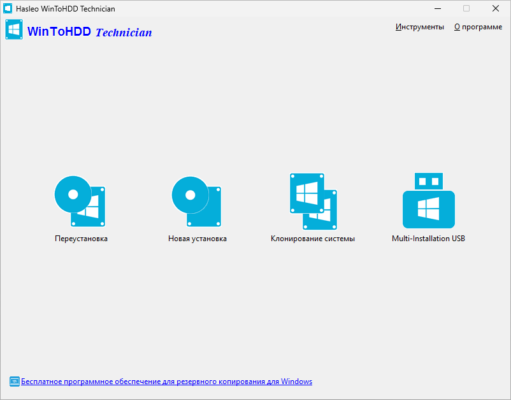
OS Deployment: Install or reinstall Windows directly from virtual image files, eliminating reliance on external media.
System Clone: Create exact copies of existing Windows partitions to HDD or SSD without loss of data or need for reinstallation.
Multi‑Install USB Creator: Build a single USB drive containing multiple Windows images for BIOS and UEFI devices.
BitLocker Encryption: Secure Windows partition during installation or clone operations.
Legacy Requirements Bypass: Install newer Windows versions while bypassing TPM or hardware requirements (useful for older PCs).
🧩 Why It Matters
Saves time and resources: Nobody needs to create bootable media—just use the local system image directly.
Ideal for cloning and migrations: Perfect for system administrators who need to replicate setups across PCs quickly.
Supports enterprise environments: The Enterprise license empowers corporations to deploy across many endpoints with ease.
Encryption support: Ensures data remains protected even during OS migrations.
✅ System Requirements & Licensing
| Criteria | Details |
|---|---|
| Supported OS | Windows Vista / 7 / 8 / 8.1 / 10 / 11 / Windows Server 2008+ |
| CPU | 1 GHz or faster (32‑bit or 64‑bit) |
| RAM | At least 1 GB (2 GB recommended) |
| Disk Space | ~10 MB installation size |
| License (Professional) | Up to 2 PCs; free lifetime updates |
| License (Enterprise) | Unlimited PCs at one organization site |
✔ Tested: This software was tested on Windows 10 & Windows 11 and works smoothly without issues.
Frequently Asked Questions
- Is this software free?
Yes, it can be downloaded and used for free. - Does it support Windows 11?
Yes, it works perfectly on Windows 10 and 11. - Is it safe to use?
Yes, the software was scanned and tested before publishing.
Last updated: January 2026