When repurposing, selling, or retiring a hard drive, SSD, or USB flash drive, simply deleting files or formatting it through Windows is not enough to ensure your data is truly gone. Deleted files can often be recovered using data recovery tools — a serious privacy and security risk.
That’s where HDD Low Level Format Tool 4.50 comes in — a professional-grade utility designed to perform low-level formatting on storage devices, effectively wiping all data at the most fundamental level.
Developed by LowLevelFormat.com , this tool goes beyond standard formatting by resetting the drive’s sectors , removing hidden data, bad sector markers, and logical errors — making it ideal for deep cleaning, device preparation, and secure data destruction.
Let’s explore what makes HDD Low Level Format Tool 4.50 a trusted solution for IT professionals, system administrators, and privacy-conscious users.
📌 What Is HDD Low Level Format Tool 4.50?
HDD Low Level Format Tool 4.50 is a Windows-based application that allows users to perform a true low-level format on hard disk drives (HDDs), solid-state drives (SSDs), USB flash drives, and memory cards.
Unlike high-level formatting (like the “Quick Format” in Windows), which only resets the file system, low-level formatting writes directly to every sector of the drive, overwriting all data with zeros or patterns — ensuring no trace of previous content remains.
⚠️ Warning: This process permanently erases all data — use only on drives you no longer need.
It’s commonly used for:
- Preparing used drives for resale
- Wiping sensitive data before disposal
- Fixing corrupted or unresponsive drives
- Restoring USB sticks with fake capacity
- Reinitializing storage for RAID or server use
The tool supports SATA, IDE, SCSI, NVMe, USB, and external drives — both internal and external.
🛠️ Key Features of HDD Low Level Format Tool 4.50
1. 🔥 Complete Data Wipe
Overwrites every sector of the drive with zeros, making data virtually impossible to recover — ideal for security and compliance.
2. 💾 Supports HDDs, SSDs & USB Drives
Works with all major storage types, including:
- Traditional hard drives
- Solid-state drives (SSD)
- USB flash drives
- SD/CF cards (via card reader)
3. 🧹 Fix Logical Errors & Bad Sectors
Resets the drive’s sector mapping, which can help resolve issues like:
- Unreadable sectors
- File system corruption
- Drive not recognized
Note: Cannot fix physical hardware damage.
4. 🖥️ Works Without OS Installation
Run the tool even if the drive is not bootable — perfect for preparing drives before installing Windows or Linux.
5. 📊 Real-Time Progress Monitoring
View detailed progress including:
- Speed (MB/s)
- Time remaining
- Number of sectors processed
- Error log
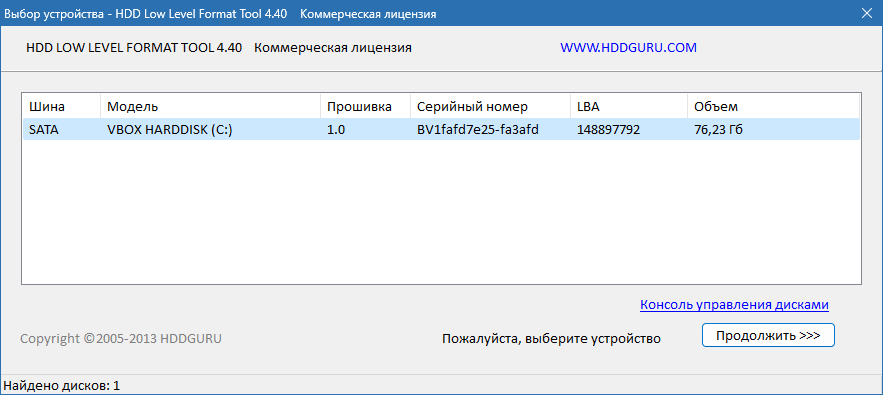
6. 🧩 Device Detection & Selection
Clearly lists all connected drives with model, size, and interface — prevents accidental formatting of the wrong drive.
7. 🔄 Re-enable Full Capacity of Fake USB Drives
Detects and restores actual capacity on counterfeit USB drives that fake their storage size.
8. ⚙️ Three-Stage Process
- Pre-format verification – Checks device health
- Low-level format – Overwrites all sectors
- Post-format verification – Confirms success
Ensures reliability and completeness.
9. 🧼 Lightweight & Portable
No installation required — run directly from USB. Works on Windows 11, 10, 8.1, 7, and older versions.
10. 🆓 Free for Personal Use
The basic version is free; a Pro license unlocks faster speeds and advanced features for commercial use.
👥 Who Should Use HDD Low Level Format Tool 4.50?
- IT Professionals: Wipe company drives before disposal.
- System Administrators: Prepare drives for servers or workstations.
- Privacy-Conscious Users: Securely erase personal data.
- Tech Enthusiasts: Fix corrupted or fake-capacity USB drives.
- Recyclers & Resellers: Clean used drives before resale.
- Forensic Experts: Prepare drives for secure reuse.
🖥️ System Requirements
- Operating System: Windows 11, 10, 8.1, 8, 7 (32-bit & 64-bit)
- RAM: 512 MB minimum
- Hard Disk Space: 50 MB free space (for the tool)
- Administrator Rights: Required
- Connected Storage Device: HDD, SSD, USB, etc.
✅ Runs from USB — no installation needed.
📈 Why Choose HDD Low Level Format Tool 4.50?
- ✅ Permanently Erases All Data
- ✅ Supports SSDs & Modern Drives
- ✅ Fixes Logical Drive Issues
- ✅ Free for Personal Use
- ✅ Portable & Easy to Use
- ✅ Trusted by Millions Worldwide
⚠️ Important Notes
- Backup First: All data will be lost permanently.
- Use with Caution: Double-check the selected drive.
- SSD Consideration: Frequent low-level formatting can reduce SSD lifespan. Use only when necessary.
- TRIM vs Low-Level: Modern SSDs use TRIM; low-level format is rarely needed but effective when required.
✅ Final Thoughts
HDD Low Level Format Tool 4.50 is not a tool for everyday use — but when you need to completely erase a drive, fix logical corruption, or restore a USB stick to its real capacity , it’s one of the most reliable and powerful options available.
With its straightforward interface, deep-level access, and proven track record, it remains a go-to utility for professionals and advanced users.
If you’re preparing a drive for reuse, donation, or disposal, and want to ensure no data can be recovered , HDD Low Level Format Tool 4.50 is definitely worth using .
For security, reliability, and complete control over your storage devices, this tool delivers exactly what it promises — a clean slate.
✔ Tested: This software was tested on Windows 10 & Windows 11 and works smoothly without issues.
Frequently Asked Questions
- Is this software free?
Yes, it can be downloaded and used for free. - Does it support Windows 11?
Yes, it works perfectly on Windows 10 and 11. - Is it safe to use?
Yes, the software was scanned and tested before publishing.
Last updated: January 2026