A logo is the foundation of every brand’s identity. Whether you’re running a small business, launching a startup, or working as a freelance designer, having the right tool to create professional, unique logos is essential. Summitsoft Logo Design Studio Pro 4.5.1.0 offers a complete solution for creating logos with ease, combining powerful design tools, customizable templates, and flexible editing features and buy.
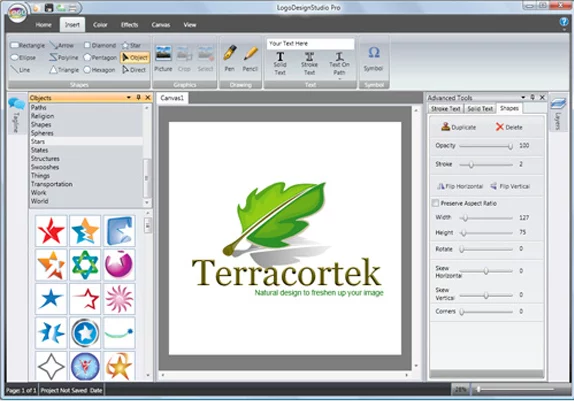
This version builds upon Summitsoft’s strong reputation for delivering easy-to-use design software that caters to both beginners and professionals.
What is Summitsoft Logo Design Studio Pro?
Logo Design Studio Pro is a professional-grade logo creation tool developed by Summitsoft. It enables users to design logos using pre-built templates, vector drawing tools, and advanced customization options. Unlike basic logo makers, it gives you full control over every design element—ensuring your logo is truly unique and adaptable for any medium.
Key Features of Logo Design Studio Pro 4.5.1.0
1. Large Template Library
Access to thousands of pre-designed logo templates.
Templates categorized by industry for faster inspiration.
2. Vector-Based Design Tools
Create scalable logos that retain sharpness at any size.
Edit shapes, lines, and curves with precision.
3. Full Customization
Change colors, fonts, gradients, and effects.
Import your own graphics for a personalized touch.
4. Advanced Text Tools
Choose from a wide range of fonts and typography options.
Apply shadows, outlines, and 3D effects to enhance text.
5. Multiple Export Options
Export logos in high-resolution formats (PNG, JPG, SVG, PDF).
Perfect for web, print, and digital branding.
What’s New in Version 4.5.1.0?
Expanded library of modern logo templates.
Improved compatibility with Windows 11.
Performance enhancements for faster editing.
Bug fixes and a smoother user interface.
Benefits of Using Summitsoft Logo Design Studio Pro
For Small Businesses
Get a professional-looking logo without paying for expensive design services.
For Freelancers and Designers
Access powerful tools to create logos for clients across different industries.
For Startups
Quickly build a strong brand identity with a unique logo tailored to your niche.
How to Create a Logo with Logo Design Studio Pro
Step 1: Choose a Template
Start with a professionally designed template from the built-in library.
Step 2: Customize the Design
Adjust colors, shapes, fonts, and layout to match your brand identity.
Step 3: Add Personal Touches
Insert your business name, tagline, or imported graphics.
Step 4: Export Your Logo
Save your design in the format best suited for print, web, or social media.
Why Choose Summitsoft Logo Design Studio Pro?
While online logo makers provide quick results, they often lack flexibility and uniqueness. Summitsoft Logo Design Studio Pro 4.5.1.0 stands out because:
It’s a one-time purchase with no subscription fees.
It offers complete creative freedom with vector-based editing.
You own 100% of your logo design rights.
Conclusion
Summitsoft Logo Design Studio Pro 4.5.1.0 is the perfect tool for anyone looking to design a professional and unique logo without relying on expensive agencies or limited online generators. Its powerful vector editing tools, extensive template library, and full customization options make it a versatile solution for businesses, startups, and designers.
If you want complete control over your brand identity, Logo Design Studio Pro 4.5.1.0 is a must-have tool for creating logos that stand out and leave a lasting impression.
✔ Tested: This software was tested on Windows 10 & Windows 11 and works smoothly without issues.
Frequently Asked Questions
- Is this software free?
Yes, it can be downloaded and used for free. - Does it support Windows 11?
Yes, it works perfectly on Windows 10 and 11. - Is it safe to use?
Yes, the software was scanned and tested before publishing.
Last updated: January 2026