
The default Windows File Explorer offers basic functionality, but power users often need more advanced tools for productivity. WinNc 11.3 is a professional dual-pane file manager that brings speed, organization, and flexibility to file operations. With its intuitive design and powerful features, it’s a perfect alternative for anyone looking to upgrade their file management workflow and buy.
Key Features of WinNc 11.3
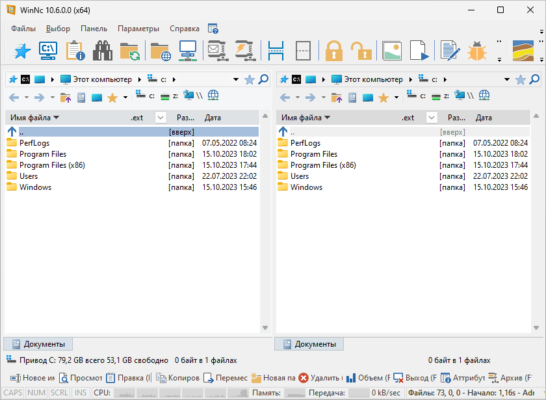
One of the highlights of WinNc is its dual-pane interface, allowing you to view two folders side by side. This makes file copying, moving, and comparing much faster and more efficient than using standard File Explorer.
The software supports tabbed browsing, meaning you can open multiple directories within one window—similar to a web browser. This reduces clutter and keeps your workflow streamlined.
WinNc also includes built-in file compression tools, supporting formats like ZIP and RAR, along with an integrated FTP client for direct file transfers to and from remote servers.
For users who handle multimedia, the program offers a file preview function, letting you quickly check images, videos, or documents without needing to open separate applications.
Benefits of Using WinNc 11.3
Faster file operations: Dual-pane and tabbed browsing save time on everyday tasks.
Better organization: Group files, create projects, and tag folders for easy management.
All-in-one tool: Combine file management, compression, and FTP without third-party apps.
Customization: Choose themes, layouts, and shortcuts that match your workflow.
The software is particularly valuable for IT professionals, developers, and anyone who deals with large volumes of files regularly.
What’s New in Version 11.3?
The 11.3 release introduces improvements in performance and stability, ensuring smoother navigation and faster file transfers. It also enhances support for Windows 11, providing better integration with the modern OS environment.
Additionally, this version includes updated user interface refinements and bug fixes that improve the overall user experience.
Why Choose WinNc Over Windows Explorer?
Unlike the limited Windows File Explorer, WinNc is designed for productivity and efficiency. Its dual-pane and tabbed interface make multitasking effortless, while its integrated utilities reduce the need for multiple separate programs.
For professionals and advanced users, these features translate to time savings and better workflow management.
Final Thoughts
WinNc 11.3 is a powerful, feature-rich alternative to the standard Windows File Explorer. With its dual-pane design, advanced utilities, and seamless integration with modern Windows systems, it’s the perfect solution for users who demand more from their file manager.
Whether you’re a casual user who wants better organization or a professional handling large file systems, WinNc 11.3 delivers the tools you need for faster and smarter file management.
✔ Tested: This software was tested on Windows 10 & Windows 11 and works smoothly without issues.
Frequently Asked Questions
- Is this software free?
Yes, it can be downloaded and used for free. - Does it support Windows 11?
Yes, it works perfectly on Windows 10 and 11. - Is it safe to use?
Yes, the software was scanned and tested before publishing.
Last updated: January 2026