
Overview of Hydrus Network 633
Hydrus Network 633 is a free and open-source media management program designed for advanced users who handle large collections of images, videos, and other media files. Built with efficiency and flexibility in mind, Hydrus allows users to tag, organize, and retrieve files effortlessly. Whether you’re a digital archivist, collector, or artist, this version gives you more control over how you manage your growing media library.
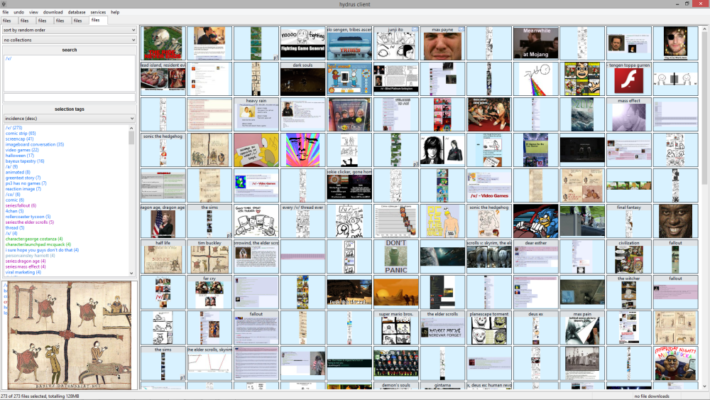
Key Features of Hydrus Network 633
Powerful Tagging System
The heart of Hydrus Network is its tagging framework. Users can add multiple tags to files, enabling precise searches and filtering. Tags can include anything from keywords, character names, and sources to custom attributes like “favorite” or “needs review.”
Smart File Organization
Hydrus automatically detects duplicate files and organizes them efficiently. You can create custom collections, apply ratings, and even generate metadata for sorting by category or relevance.
Local and Network Support
The software can work both locally and across networks. This allows multiple users to access and manage shared libraries while keeping file integrity and privacy intact.
Improvements in Version 633
Enhanced Speed and Stability
Version 633 introduces optimized database handling, reducing lag when searching or importing large batches of media. Performance has been improved significantly for users with libraries containing thousands of files.
Updated Interface and Tools
The new interface refinements make browsing and tagging smoother. The thumbnail grid and tag panels are now more responsive, and several new shortcuts simplify repetitive actions.
Better Import and Export Options
Hydrus Network 633 also refines its import/export tools, making it easier to back up collections or share tags with other users. The updated parser allows direct downloads from multiple sources with custom rules.
How to Use Hydrus Network 633
Installation and Setup
Installing Hydrus Network is straightforward. Download the program for Windows, Linux, or macOS, extract the package, and launch the executable. The setup wizard will help you choose where to store your media and database files.
Adding and Tagging Files
After installation, drag and drop your media files into the program. Hydrus automatically scans and indexes them. You can then start tagging manually or use automatic tag importers from supported sites to speed up the process.
Searching and Managing Collections
The search engine in Hydrus is one of the most advanced features. It supports complex queries using logical operators, allowing you to find media quickly based on tags, file type, resolution, or creation date.
Privacy and Control
Local Database Encryption
All media and metadata are stored locally by default, giving you full control over your content without relying on cloud services. Users concerned about privacy will appreciate that no external servers are involved.
Optional Synchronization
If you want to access your library remotely, Hydrus supports secure synchronization between trusted computers using built-in networking features.
Why Choose Hydrus Network 633
Hydrus Network stands out for users who prefer customization, data control, and automation. Unlike commercial cloud-based services, it offers transparency and extensibility through its open-source design. Advanced users can create custom scripts, tag importers, and automation rules to suit their workflow.
Final Verdict
The Ultimate Open-Source Media Organizer
Hydrus Network 633 is a robust and highly flexible solution for organizing massive media libraries. Its tagging power, automation, and privacy-first design make it an invaluable tool for collectors, archivists, and anyone managing digital art or photography collections.
If you value speed, customization, and local control, Hydrus Network 633 is one of the best free tools available for serious media management.
✔ Tested: This software was tested on Windows 10 & Windows 11 and works smoothly without issues.
Frequently Asked Questions
- Is this software free?
Yes, it can be downloaded and used for free. - Does it support Windows 11?
Yes, it works perfectly on Windows 10 and 11. - Is it safe to use?
Yes, the software was scanned and tested before publishing.
Last updated: January 2026