
Monitoring your system’s performance is crucial for maintaining stability and efficiency. TrafficMonitor 1.85 is a lightweight and versatile utility for Windows that displays real-time network speed, CPU usage, and memory consumption directly on your desktop. Designed for both casual users and professionals, it provides quick insights without overwhelming the system with heavy resource usage.
What is TrafficMonitor 1.85?
TrafficMonitor 1.85 is a system monitoring tool that allows users to track internet traffic, processor load, and memory usage in real-time. It sits conveniently in the taskbar or can be displayed as a floating widget on the desktop, making essential performance metrics always visible.
Key Features of TrafficMonitor 1.85
- Real-Time Network Monitoring: Displays upload and download speeds instantly.
- CPU & Memory Tracking: Helps users understand system performance and resource usage.
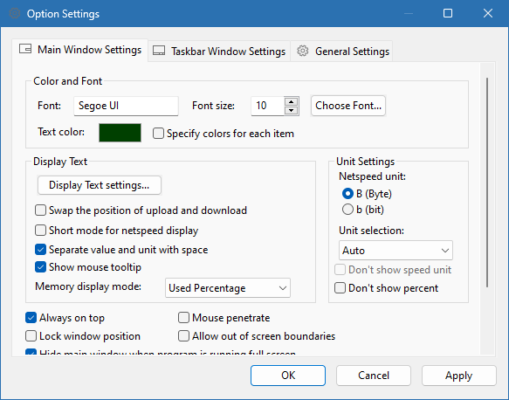
- Customizable Interface: Supports themes, font adjustments, and widget positioning.
- Taskbar Integration: Shows live data directly in the Windows taskbar.
- Floating Window Mode: Provides a transparent, resizable widget for desktop display.
- Low Resource Usage: Lightweight software that won’t slow down the system.
Benefits of Using TrafficMonitor 1.85
- For Gamers: Monitor system load during gaming to avoid overheating or lag.
- For Developers: Track performance while running heavy applications or simulations.
- For General Users: Keep an eye on internet speed and system health at all times.
- For Power Users: Customize display settings to suit workflow preferences.
Why Choose TrafficMonitor 1.85?
Unlike other system monitoring tools, TrafficMonitor 1.85 is completely free, open-source, and lightweight. It provides essential performance metrics without unnecessary bloat. Its simple design ensures that users can focus on their tasks while staying informed about their system’s status.
Conclusion
TrafficMonitor 1.85 is the perfect choice for Windows users who want a reliable and lightweight solution for monitoring network traffic and system performance. With its customizable interface, taskbar integration, and real-time updates, it strikes the right balance between functionality and simplicity.
✔ Tested: This software was tested on Windows 10 & Windows 11 and works smoothly without issues.
Frequently Asked Questions
- Is this software free?
Yes, it can be downloaded and used for free. - Does it support Windows 11?
Yes, it works perfectly on Windows 10 and 11. - Is it safe to use?
Yes, the software was scanned and tested before publishing.
Last updated: January 2026