
What Is NetSpot 3.2.0.540 / Enterprise 5.1.0.703?
NetSpot 3.2.0.540 / Enterprise 5.1.0.703 is a professional Wi-Fi analysis and site survey tool used to visualize and optimize wireless networks.
It allows you to detect weak spots, interference sources, and dead zones in your Wi-Fi coverage. With its clear heatmaps and advanced diagnostics, NetSpot helps you achieve optimal wireless performance whether at home, in an office, or across a large enterprise environment.
Key Features of NetSpot 3.2.0.540 / Enterprise 5.1.0.703
📶 Comprehensive Wi-Fi Analysis
NetSpot collects detailed data about all nearby wireless networks — including signal strength, channel usage, and interference levels — giving you full visibility of your Wi-Fi environment.
🗺️ Visual Heatmaps
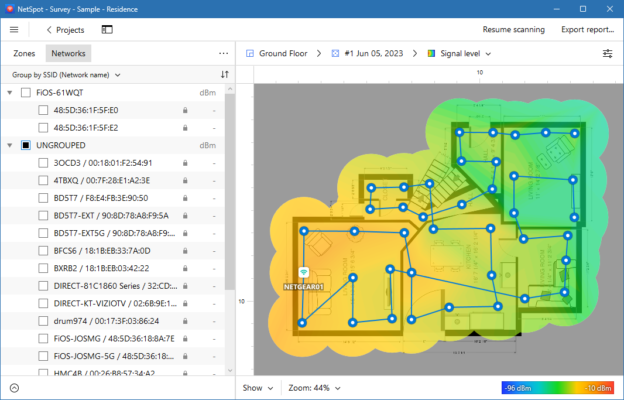
The tool generates easy-to-understand heatmaps that visually represent Wi-Fi signal distribution across a physical space, helping identify weak coverage areas instantly.
⚙️ Two Powerful Modes
NetSpot includes Discover Mode for real-time Wi-Fi scanning and Survey Mode for detailed coverage mapping. Both modes work together to ensure your network is optimized.
🧠 Smart Troubleshooting
It identifies connectivity issues, overlapping channels, and interference sources to improve network reliability and speed.
🏢 Enterprise-Grade Features
The Enterprise edition supports large-scale deployments, advanced export options, and multi-project management — perfect for IT professionals and corporate network engineers.
Why Choose NetSpot?
1. Easy-to-Use Interface
NetSpot’s intuitive layout makes Wi-Fi diagnostics simple, even for non-technical users. Just open the app and start scanning your surroundings.
2. Professional-Level Accuracy
It uses precise algorithms to provide real-time data and heatmaps that reflect true wireless signal behavior.
3. Compatible with All Environments
Whether you’re managing home Wi-Fi, office networks, or educational campuses, NetSpot adapts to any environment seamlessly.
4. Cross-Platform Support
NetSpot is available for both Windows and macOS, offering consistent features and performance on all systems.
How to Use NetSpot Effectively
Install and launch NetSpot on your laptop.
Start Discover Mode to view all nearby Wi-Fi networks.
Switch to Survey Mode and upload a floor plan or map of your space.
Walk through the area to collect signal data points.
Analyze heatmaps to locate weak spots or interference zones.
Adjust routers or access points based on the results for better coverage.
System Requirements
OS: Windows 7, 8, 10, 11 or macOS 10.12+
RAM: 2GB or higher
Disk Space: 200MB free
Wi-Fi Adapter: 802.11a/b/g/n/ac compatible
Conclusion
NetSpot 3.2.0.540 / Enterprise 5.1.0.703 stands out as one of the best Wi-Fi analysis tools for both home users and professionals.
It combines ease of use with advanced diagnostic power, helping you visualize, test, and enhance your wireless network effortlessly.
If you need to ensure stable, high-speed Wi-Fi coverage, NetSpot is a smart and reliable choice.
✔ Tested: This software was tested on Windows 10 & Windows 11 and works smoothly without issues.
Frequently Asked Questions
- Is this software free?
Yes, it can be downloaded and used for free. - Does it support Windows 11?
Yes, it works perfectly on Windows 10 and 11. - Is it safe to use?
Yes, the software was scanned and tested before publishing.
Last updated: January 2026