
Net Monitor for Employees Professional 6.4.9 – Efficient Employee Monitoring Solution
Net Monitor for Employees Professional 6.4.9 is a robust monitoring tool designed to help managers and IT administrators track and manage employee computer activity. By providing real-time insights into staff usage, it enhances productivity, ensures compliance, and helps maintain a secure work environment.
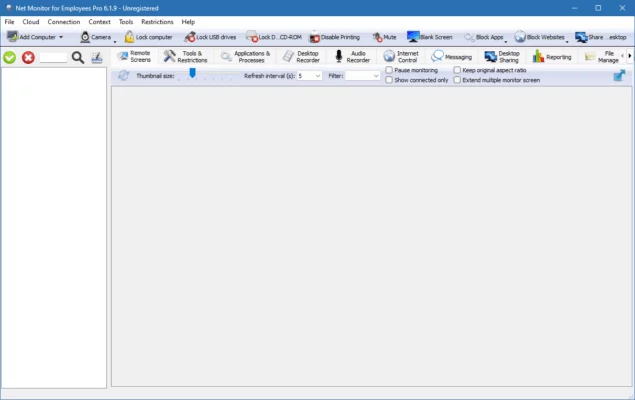
What Is Net Monitor for Employees Professional?
This software allows organizations to view screens of all connected computers in a network, record activity, and analyze usage patterns. It’s ideal for offices, call centers, and educational institutions where monitoring productivity and managing resources efficiently is essential.
Key Features
Real-Time Screen Monitoring:
View live screens of all connected computers to supervise employee activities.Remote Control:
Access and control remote computers when necessary to assist or troubleshoot.Activity Logging:
Record user activities, including websites visited, applications used, and idle time.Message Broadcasting:
Send messages or alerts to employees directly from the administrator console.Reporting & Analytics:
Generate detailed reports on productivity, computer usage, and software access.Easy Network Deployment:
Compatible with local networks, making installation and management straightforward.Privacy & Security Controls:
Restrict access to unauthorized websites and applications to maintain workplace security.
Why Use Net Monitor for Employees Professional 6.4.9?
Tracking employee activity ensures accountability, reduces idle time, and optimizes resource utilization. Net Monitor for Employees Professional 6.4.9 is perfect for:
Managers who want to improve team productivity.
IT administrators ensuring proper usage of network resources.
Educational institutions supervising student computer usage.
By monitoring real-time activity and producing comprehensive reports, companies can make informed decisions and enhance operational efficiency.
System Requirements
OS: Windows 11, 10, 8.1, 8, 7
RAM: Minimum 2 GB
Disk Space: 150 MB free space
Network: LAN or VPN connection for remote monitoring
How to Use
Install the Net Monitor for Employees Professional 6.4.9 client on employee computers.
Install the administrator console on your workstation.
Connect to the network and start real-time monitoring.
Use reporting tools to analyze employee activity and generate productivity reports.
Final Verdict
Net Monitor for Employees Professional 6.4.9 is a comprehensive and reliable solution for businesses looking to monitor, manage, and optimize workforce productivity. Its combination of live monitoring, detailed analytics, and user-friendly interface makes it a top choice for modern offices.
✔ Tested: This software was tested on Windows 10 & Windows 11 and works smoothly without issues.
Frequently Asked Questions
- Is this software free?
Yes, it can be downloaded and used for free. - Does it support Windows 11?
Yes, it works perfectly on Windows 10 and 11. - Is it safe to use?
Yes, the software was scanned and tested before publishing.
Last updated: January 2026