Camtasia Studio 8 is a robust and versatile screen recording and video editing software developed by TechSmith. Released as a professional-grade tool, it allows users to create high-quality video content such as tutorials, demonstrations, webinars, presentations, and more. With a user-friendly interface and powerful features, Camtasia Studio 8 is ideal for both beginners and experienced video editors and buy.
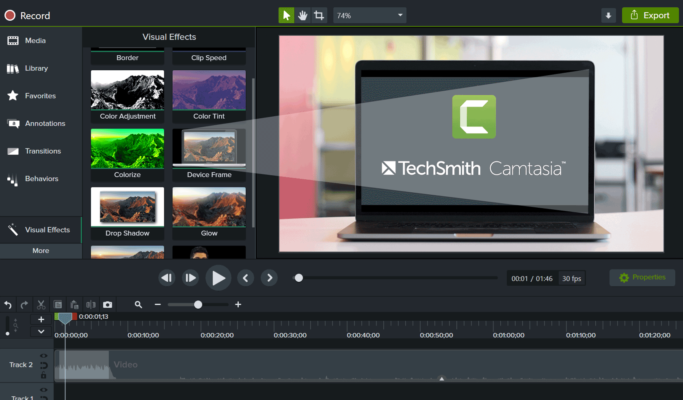
🌟 Key Features:
Screen Recording
Camtasia Studio 8 allows you to record your entire screen, a specific window, or a selected area. Whether you’re capturing software tutorials, video calls, or gameplay, it provides smooth and high-resolution recordings.Webcam and Audio Recording
You can include webcam footage and narrations in your recordings. The software captures system audio and microphone input, enabling you to add detailed explanations and voiceovers.Multi-track Timeline Editing
The powerful multi-track timeline lets you organize and edit your video with precision. You can cut, trim, split, and move clips, add transitions, and insert media layers with ease.Built-in Visual Effects
Enhance your videos with callouts, annotations, zoom-and-pan effects, cursor effects, and animated transitions. These tools help emphasize important parts and keep viewers engaged.Green Screen Feature
Use the chroma key feature to remove backgrounds from webcam footage and replace them with images or custom video backgrounds — perfect for professional presentations.Interactive Elements
Create quizzes, clickable links, and table of contents to make your videos interactive and more engaging. Ideal for e-learning and employee training content.Direct Export
Export your videos directly to formats like MP4, AVI, or WMV or upload them to platforms such as YouTube, Vimeo, Google Drive, or TechSmith Screencast.
🎯 Who Should Use Camtasia Studio 8?
Educators: Create instructional videos, online lessons, and tutorials.
Business Professionals: Make product demos, training videos, or walkthroughs.
Content Creators: Build YouTube content, how-to guides, and software reviews.
Students: Record lectures and presentations for academic use.
🚀 Performance & System Requirements:
Camtasia Studio 8 is optimized to run on most Windows systems. It offers good performance on moderate hardware but excels on systems with a modern CPU and at least 4GB of RAM.
✅ Pros:
Intuitive user interface
Extensive editing tools
High-quality output
Great for e-learning and business
❌ Cons:
Lacks some advanced editing features compared to professional NLEs
May require a learning curve for first-time users
🆕 Final Thoughts:
Despite being an older version, Camtasia Studio 8 still holds up as a reliable and easy-to-use screen recording and editing software. It is especially favored by educators, marketers, and trainers for its simplicity, interactivity, and dependable output. Whether you’re creating your first tutorial or managing a video training series, Camtasia Studio 8 remains a solid choice.
✔ Tested: This software was tested on Windows 10 & Windows 11 and works smoothly without issues.
Frequently Asked Questions
- Is this software free?
Yes, it can be downloaded and used for free. - Does it support Windows 11?
Yes, it works perfectly on Windows 10 and 11. - Is it safe to use?
Yes, the software was scanned and tested before publishing.
Last updated: January 2026