
AutoHideMouseCursor 5.91 — Keep Your Screen Clean and Focused
AutoHideMouseCursor 5.91 is a lightweight Windows utility designed to automatically hide the mouse pointer after a set period of inactivity. This simple yet effective tool helps users maintain a distraction-free environment, especially when watching videos, reading, or giving presentations.
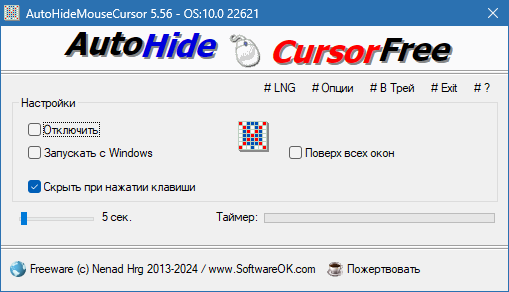
Developed by Nenad Hrg, AutoHideMouseCursor is known for being small, portable, and extremely efficient. It consumes minimal system resources and works flawlessly in the background without interrupting your workflow.
Key Features of AutoHideMouseCursor 5.91
Automatic Cursor Hiding
The main feature of this utility is its ability to hide the mouse pointer automatically after a specified idle time. You can adjust the delay according to your preference — from one second up to several minutes. Once you move the mouse, the cursor instantly reappears.
Lightweight and Portable
AutoHideMouseCursor is a tiny executable that requires no installation. You can run it directly from a USB drive or your desktop. It uses very little CPU and memory, making it perfect for low-end systems or users who prefer clean, minimal setups.
Customizable Settings
This version offers several options for personalization. Users can:
Adjust the auto-hide delay time.
Enable or disable automatic startup with Windows.
Choose whether to hide the cursor only in full-screen mode.
Use hotkeys to quickly activate or deactivate the tool.
These features make it ideal for gamers, streamers, and media users who often need a clear display without the distraction of a visible cursor.
What’s New in Version 5.91
Performance and Stability Improvements
AutoHideMouseCursor 5.91 introduces better system compatibility and stability for modern versions of Windows. It ensures smooth operation even when using multiple monitors or custom display configurations.
Updated User Interface
The interface has been slightly redesigned for simplicity and better readability. Users can now easily modify settings or minimize the tool to the system tray with a single click.
Bug Fixes and Enhancements
The latest version fixes minor bugs and improves background performance, ensuring faster response when hiding and restoring the cursor.
Why Use AutoHideMouseCursor
AutoHideMouseCursor is particularly useful for people who watch movies, run slideshow presentations, or play games where the mouse pointer can become a distraction. It also helps graphic designers and coders who need a clean workspace while focusing on visuals or text.
Because it’s portable and requires no installation, the program doesn’t modify your system registry or slow down your computer. It can be safely used on any Windows version, including Windows 11, 10, 8, and 7.
How It Works
Once launched, the program sits quietly in the background and tracks mouse activity. If no movement is detected after your chosen idle period, the cursor automatically disappears. As soon as you move the mouse or press a key, the pointer reappears instantly — ensuring seamless usability.
This simple mechanism is both reliable and resource-efficient, providing a smooth user experience without additional complexity.
Conclusion
AutoHideMouseCursor 5.91 is an excellent tool for users who want a cleaner desktop and a distraction-free experience. It’s fast, portable, and requires no technical skills to use.
With customizable delay options, lightweight performance, and strong Windows compatibility, it’s the perfect solution for anyone who frequently works or watches content on a PC and wants the screen to stay tidy.
✔ Tested: This software was tested on Windows 10 & Windows 11 and works smoothly without issues.
Frequently Asked Questions
- Is this software free?
Yes, it can be downloaded and used for free. - Does it support Windows 11?
Yes, it works perfectly on Windows 10 and 11. - Is it safe to use?
Yes, the software was scanned and tested before publishing.
Last updated: January 2026