LizardSystems Remote Process Explorer 25.05 is a professional tool for IT administrators and advanced users who need full control over processes running on remote computers. Unlike traditional task managers that only work locally, this software allows you to monitor, analyze, and manage processes across a network in real time and buy.
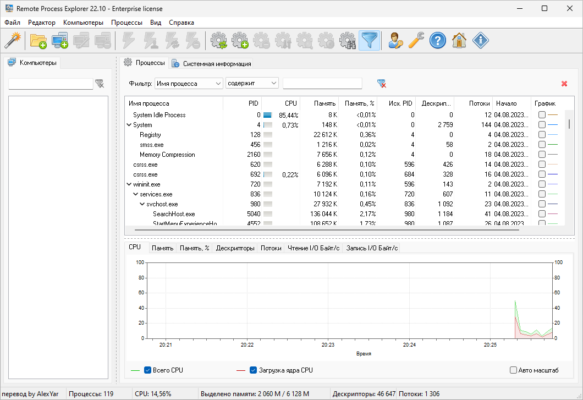
Why Choose Remote Process Explorer?
In large organizations or IT environments, managing multiple computers at once can be a challenge. Manually accessing each workstation is time-consuming and inefficient.
With Remote Process Explorer 25.05, administrators gain the ability to:
View running processes on remote PCs.
Analyze performance and resource usage.
Terminate unresponsive or dangerous tasks.
Start or stop processes remotely with ease.
This makes the tool essential for maintaining system stability, optimizing performance, and improving security.
Key Features of LizardSystems Remote Process Explorer 25.05
📊 Real-Time Process Monitoring
The program displays detailed information about all processes on remote computers, including CPU usage, memory consumption, and running status.
🔒 Secure Remote Access
Using advanced authentication methods, Remote Process Explorer ensures secure access to remote PCs without compromising network safety.
⚡ Full Process Control
Administrators can terminate processes, change their priority, or launch new ones remotely. This feature helps in troubleshooting and resolving issues without physical access.
🌍 Multi-Computer Management
The software is designed to handle multiple remote machines simultaneously, making it ideal for enterprise environments with dozens or hundreds of systems.
🖥️ Easy-to-Use Interface
Despite its advanced features, the program offers an intuitive interface that makes it accessible even for less-experienced administrators.
Benefits for IT Administrators and Businesses
👨💻 For IT Professionals
Remote Process Explorer reduces downtime by allowing admins to quickly resolve issues on remote machines. It also improves efficiency by centralizing process management in one tool.
🏢 For Organizations
Businesses benefit from improved security and productivity. By preventing resource-hogging applications or unauthorized processes, employees can work in a stable and secure environment.
Compatibility and System Requirements
Remote Process Explorer 25.05 is compatible with modern Windows operating systems, including Windows 10 and Windows 11. It integrates seamlessly into network environments and requires minimal setup.
The lightweight design ensures smooth operation, even when managing multiple computers at once.
Final Verdict
If you need a reliable and secure way to manage processes on remote computers, LizardSystems Remote Process Explorer 25.05 is an excellent choice. It combines advanced monitoring, process control, and multi-computer management in one professional package.
By using this tool, IT administrators and organizations can save time, enhance system performance, and maintain better control over their network infrastructure.
✔ Tested: This software was tested on Windows 10 & Windows 11 and works smoothly without issues.
Frequently Asked Questions
- Is this software free?
Yes, it can be downloaded and used for free. - Does it support Windows 11?
Yes, it works perfectly on Windows 10 and 11. - Is it safe to use?
Yes, the software was scanned and tested before publishing.
Last updated: January 2026