
🗂️ Adobe Bridge 2026 v16.0: Your Central Hub for Creative Assets
In a world of scattered folders, duplicate files, and lost RAW photos, Adobe Bridge 2026 (version 16.0) remains the unsung hero of creative workflows. This free, powerful digital asset manager—included with every Adobe Creative Cloud subscription—helps photographers, designers, and video editors organize, preview, label, and batch-process thousands of files without opening Photoshop, Lightroom, or Premiere Pro.
While cloud-based tools rise in popularity, Bridge 2026 doubles down on local file control, metadata precision, and offline reliability—making it indispensable for professionals who demand full ownership of their media library.
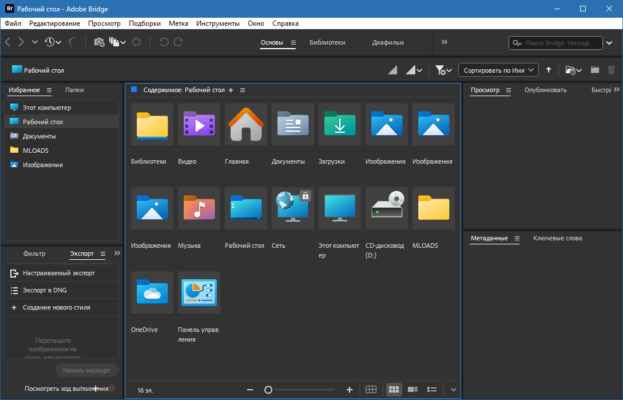
🌟 What’s New in Bridge 2026 v16.0?
Adobe’s 2026 update refines performance and modernizes the interface while keeping Bridge’s core philosophy intact:
- 🚀 Faster thumbnail rendering for high-res RAW and video files
- 🌓 Improved dark mode with better contrast and icon clarity
- 📁 Enhanced folder sync with network and external drives
- 🖼️ Better HEIF/HEIC and AVIF support on Windows
- 🐞 Fixed crashes when handling large metadata batches
💡 Note: Adobe Bridge is free—no subscription required to use it, though it integrates best with Creative Cloud apps.
✨ Key Features That Make Bridge Essential
👁️ High-Fidelity Previews
View PSD, AI, INDD, RAW, DNG, MOV, MP4, and more—with full layer and metadata support—without launching the native app.
🏷️ Advanced Metadata & Keywords
Add IPTC, EXIF, or custom metadata in bulk. Filter by camera, lens, rating, color label, or keyword instantly.
🖌️ Batch Processing Power
- Rename hundreds of files using custom templates
- Apply copyright watermarks via Photoshop Actions
- Convert RAW to JPEG/DNG in bulk
- Export contact sheets or PDF catalogs
🔄 Seamless Adobe Integration
- Open files directly in Photoshop, Illustrator, InDesign, or Premiere Pro
- Send images to Camera Raw for non-destructive edits
- Sync color labels and ratings across apps
🔒 Local-First & Privacy-Focused
Unlike cloud libraries, Bridge works 100% offline—ideal for studios handling sensitive or client-confidential assets.
💼 Who Should Use Adobe Bridge?
- Photographers: Manage RAW libraries without Lightroom’s subscription model
- Graphic Designers: Preview and organize brand assets, logos, and templates
- Video Editors: Browse footage, mark selects, and log clips before editing
- Archivists & Educators: Catalog and annotate large media collections
💡 Perfect for users who prefer manual control over automated cloud sync.
📥 How to Get Adobe Bridge 2026
Bridge is free to download and use—even without a Creative Cloud subscription:
- Visit the official Adobe Bridge page
- Click “Download”
- Install and start organizing your creative files
🔗 Official Download: https://www.adobe.com/products/bridge.html
✅ Works on Windows 10/11 and macOS 12+
✅ No watermarks, no trial limits, no paywall
⚖️ Bridge vs. Lightroom: Which One?
- Use Bridge if you want local file control, batch automation, and multi-app support (Photoshop + InDesign + Premiere).
- Use Lightroom if you prefer cloud sync, AI-powered organization, and mobile editing.
Many pros use both: Bridge for archival and batch work, Lightroom for active photo editing.
💬 Final Thoughts
Adobe Bridge 2026 v16.0 proves that sometimes, the best tools are the ones that stay out of your way—while quietly making your workflow faster, cleaner, and more organized. In an era of subscription fatigue and cloud dependency, Bridge stands as a free, powerful, and privacy-respecting asset manager that just works.
🗂️ Your files. Your rules. Perfectly organized.
✔ Tested: This software was tested on Windows 10 & Windows 11 and works smoothly without issues.
Frequently Asked Questions
- Is this software free?
Yes, it can be downloaded and used for free. - Does it support Windows 11?
Yes, it works perfectly on Windows 10 and 11. - Is it safe to use?
Yes, the software was scanned and tested before publishing.
Last updated: January 2026