
PC Timer .NET 18.30 Overview
PC Timer .NET 18.30 is a lightweight and powerful Windows application designed for task automation and efficient time management. It allows users to schedule various system tasks such as shutdowns, restarts, logoffs, and program launches. Ideal for both home users and professionals, PC Timer .NET helps increase productivity and automate routine operations on your PC.
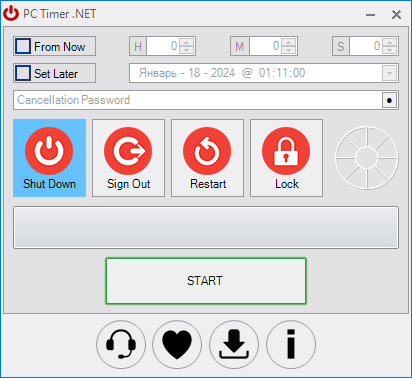
With its intuitive interface, even beginners can set up complex schedules without needing technical expertise. This tool ensures that your PC performs tasks at the right time without manual intervention, saving energy and improving workflow efficiency.
Key Features of PC Timer .NET 18.30
Flexible Task Scheduling
PC Timer .NET allows users to schedule single or recurring tasks. You can set tasks to run at specific times, after a countdown, or based on events like system idle.
System Automation
Automate operations such as shutdown, restart, sleep, hibernate, or logoff. Additionally, you can launch applications or scripts automatically according to your schedule.
Custom Alerts and Notifications
The software provides visual and audio notifications before tasks execute, ensuring that you are aware of upcoming automated actions. This feature helps prevent accidental interruptions.
Easy-to-Use Interface
The program’s interface is clean, simple, and easy to navigate. Tasks can be created, edited, and managed effortlessly without any complicated setup.
Power Management
PC Timer .NET helps reduce energy consumption by allowing users to schedule shutdowns or sleep mode after work is done. This is especially useful for laptops and desktops running long operations overnight.
How to Use PC Timer .NET
Install the application and open the main interface.
Add a new task by selecting the type (shutdown, restart, program launch).
Set the schedule using either countdown, specific time, or recurring settings.
Enable notifications if needed to alert users before task execution.
Start the timer and let the software handle your automated tasks.
Why Choose PC Timer .NET 18.30
PC Timer .NET is lightweight, reliable, and fully compatible with Windows 11, 10, 8, and 7. It’s perfect for users who want to save time, automate repetitive tasks, and manage their PC efficiently. The program is ideal for both personal and professional use, whether you want to automate downloads, backups, or energy-saving routines.
System Requirements
Operating System: Windows 11, 10, 8, 7
Processor: 1 GHz or faster
RAM: 512 MB minimum (1 GB recommended)
Disk Space: 50 MB free space
Conclusion
PC Timer .NET 18.30 is a practical and powerful tool for automating PC tasks and managing time effectively. With its flexible scheduling, easy interface, and energy-saving features, it helps both individuals and professionals improve productivity while keeping their PC operations streamlined and efficient.
✔ Tested: This software was tested on Windows 10 & Windows 11 and works smoothly without issues.
Frequently Asked Questions
- Is this software free?
Yes, it can be downloaded and used for free. - Does it support Windows 11?
Yes, it works perfectly on Windows 10 and 11. - Is it safe to use?
Yes, the software was scanned and tested before publishing.
Last updated: January 2026