
Bing Wallpaper 11.416: Bring the World’s Beauty to Your Desktop—Every Day 🌍💻
Tired of the same old background? Bing Wallpaper 11.416 is a lightweight, free Windows app that automatically downloads and sets Bing’s stunning “Image of the Day” as your desktop wallpaper—no effort required.
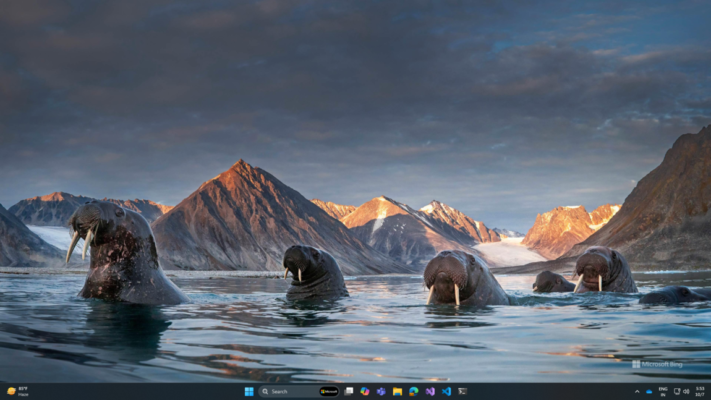
From majestic mountains and serene beaches to vibrant cities and rare wildlife, each image is a high-resolution masterpiece curated by Microsoft. With Bing Wallpaper, your desktop becomes a daily visual escape.
🌟 Why Use Bing Wallpaper?
- Free & official: Developed by Microsoft (formerly part of Bing Desktop)
- High-quality images: 1920×1080 or higher, professionally shot
- Educational: Each image includes a caption with location and fun facts
- Lightweight: Runs quietly in the background with minimal resource use
- Automatic: Updates your wallpaper every day at sunrise (or on login)
Perfect for nature lovers, photographers, travelers, or anyone who appreciates beauty in the everyday.
✨ Key Features of Version 11.416
📅 1. Daily Automatic Updates
The app checks for Bing’s latest image each day and applies it seamlessly—no manual downloads or settings.
🖼️ 2. High-Resolution Backgrounds
All images are optimized for modern HD and 4K displays, ensuring crisp, vibrant visuals.
ℹ️ 3. Image Info & Location Details
Hover over the system tray icon or open the app to see:
- Photo title
- Location (e.g., “Torres del Paine, Chile”)
- Photographer credit
- Interesting facts about the scene
⚙️ 4. Simple & Clean Interface
Minimal UI with just the essentials:
- “Apply now” button
- Option to view image history
- Toggle auto-start with Windows
🖥️ 5. Multi-Monitor Support
Sets the same beautiful image across all displays—perfect for dual-screen or ultrawide setups.
🛠️ How to Use Bing Wallpaper 11.416
- 📥 Download: Get the latest version from the Microsoft Store or trusted software repositories.
- ✅ Install & Launch: The app runs silently in the system tray (⊞ + B).
- 🖼️ Enjoy: Your wallpaper updates automatically every day!
- 🔍 Explore: Click the tray icon to learn about today’s photo.
💡 Tip: You can manually trigger an update or browse past images directly from the app window.
🆚 Bing Wallpaper vs. Manual Downloads
Why do the work when Bing Wallpaper does it for you—beautifully and reliably?
💡 Final Thoughts: A Daily Dose of Wonder
Bing Wallpaper 11.416 turns your desktop into a window to the world—one breathtaking photo at a time. It’s free, effortless, and endlessly inspiring.
🌅 Start your day with awe. Let Bing Wallpaper bring the planet’s beauty to your screen—every single morning.
🔒 Always download from official sources like the Microsoft Store to ensure safety and authenticity.
✔ Tested: This software was tested on Windows 10 & Windows 11 and works smoothly without issues.
Frequently Asked Questions
- Is this software free?
Yes, it can be downloaded and used for free. - Does it support Windows 11?
Yes, it works perfectly on Windows 10 and 11. - Is it safe to use?
Yes, the software was scanned and tested before publishing.
Last updated: January 2026