
What Is Wallpaper Engine 2.7.3?
Wallpaper Engine 2.7.3 is one of the most popular desktop customization tools that lets you bring your screen to life with interactive, animated, and video-based wallpapers. Unlike static images, this program allows users to create a fully dynamic experience using 2D and 3D animations, websites, or even application interfaces as wallpapers and buy.
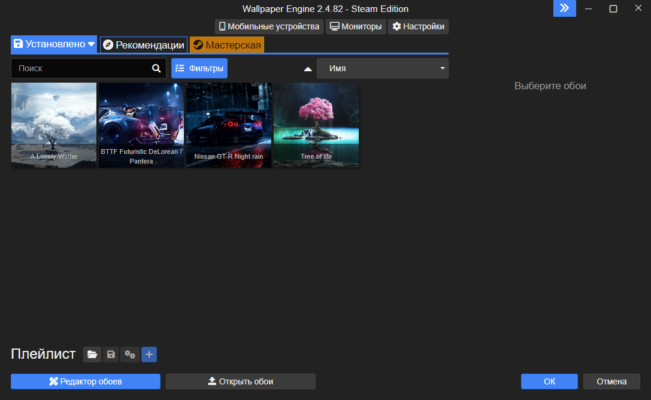
It supports multiple monitors, 4K resolutions, and a wide range of formats, offering complete control over how your desktop looks and feels. Whether you’re a gamer, designer, or casual user, Wallpaper Engine provides endless creativity options to personalize your workspace.
Key Features of Wallpaper Engine 2.7.3
1. Dynamic and Interactive Wallpapers
The program supports real-time animated backgrounds that respond to system events, sound, or mouse movements, adding a sense of depth and motion to your screen.
2. Extensive Format Support
Wallpaper Engine allows you to use videos (MP4, WebM), static images, or HTML-based content as wallpapers. You can even import your own creations or download new ones from the integrated Steam Workshop.
3. Performance Optimization
Despite running live wallpapers, Wallpaper Engine is optimized to minimize CPU and GPU usage. It automatically pauses wallpapers when you play games or switch to fullscreen mode, ensuring no performance loss.
4. Audio-Responsive Visuals
With the audio visualizer feature, your wallpapers can react to your system’s music or sound output, creating a unique and immersive experience.
5. Multi-Monitor and 4K Support
You can apply different wallpapers to each monitor, adjust scaling for ultrawide displays, and enjoy crystal-clear quality even in 4K setups.
How to Use Wallpaper Engine 2.7.3
Using Wallpaper Engine is simple and intuitive:
- Install and launch the application on your Windows device.
- Browse the Wallpaper Library or the Steam Workshop to find new designs.
- Select your preferred wallpaper and adjust the playback settings such as speed, brightness, or quality.
- Apply the wallpaper instantly and enjoy the transformation.
- Optionally, create your own wallpaper using the built-in Wallpaper Editor, which supports particle effects, parallax, and animation layers.
Advantages of Using Wallpaper Engine
- Brings your desktop to life with motion and sound.
- Highly customizable and user-friendly interface.
- Supports automatic pausing to save system resources.
- Large community-driven collection via Steam Workshop.
- Regular updates with new features and performance enhancements.
Wallpaper Engine has become a top choice for users who value both aesthetics and performance.
Final Thoughts
Wallpaper Engine 2.7.3 is the ultimate solution for personalizing your desktop with animated and interactive backgrounds. It balances creativity and performance, offering a stunning visual experience without slowing down your system. Whether you want relaxing nature scenes, futuristic motion graphics, or reactive music visuals, this tool delivers it all.
✔ Tested: This software was tested on Windows 10 & Windows 11 and works smoothly without issues.
Frequently Asked Questions
- Is this software free?
Yes, it can be downloaded and used for free. - Does it support Windows 11?
Yes, it works perfectly on Windows 10 and 11. - Is it safe to use?
Yes, the software was scanned and tested before publishing.
Last updated: January 2026