
Flow Launcher 2.0.2: The Ultimate Productivity Launcher for Windows Power Users ⚡
Tired of digging through Start menus or cluttered desktops? Flow Launcher 2.0.2 is a fast, lightweight, and open-source application launcher for Windows that lets you open apps, search files, calculate, translate, and control your system—all from a single keyboard shortcut.
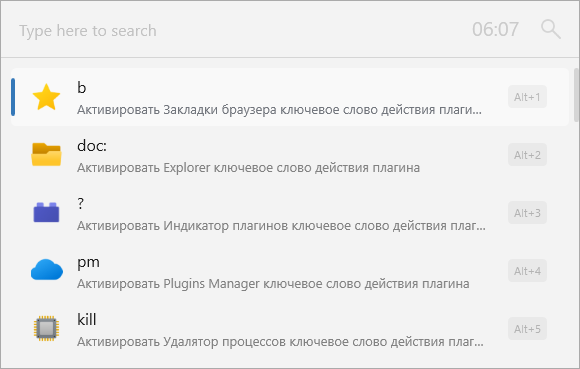
Inspired by macOS Spotlight and Alfred, Flow Launcher brings instant access to everything on your PC—with powerful plugins, themes, and full customization.
🎯 Why Use Flow Launcher?
- ✅ Open-source & free (no ads, no telemetry)
- ✅ Blazing fast – launches in milliseconds
- ✅ Extensible via plugins (100+ community-built)
- ✅ Fully customizable – themes, shortcuts, and workflows
- ✅ Privacy-first – all processing happens locally
Perfect for developers, power users, and anyone who wants to work faster with just their keyboard.
✨ Key Features of Flow Launcher 2.0.2
🔍 1. Instant App & File Search
- Type any app name (e.g., “Chrome”) and launch it instantly
- Search files and folders by name across your drives
- Fuzzy matching finds results even with typos
🧩 2. Powerful Plugin Ecosystem
Install plugins to add features like:
- 🌐 Web search (Google, DuckDuckGo, YouTube)
- 📅 Calendar & reminders
- 🧮 Unit/currency conversion & calculator
- 🎵 Media controls (Spotify, VLC)
- 📋 Clipboard history
- 💻 System commands (restart, sleep, volume)
💡 Plugins are easy to install from the built-in Plugin Store.
🎨 3. Custom Themes & UI
- Choose from dozens of community themes (dark, glass, minimal, etc.)
- Adjust font size, window width, and animation speed
- Toggle result icons, descriptions, and preview
⌨️ 4. Keyboard-First Workflow
- Default shortcut: Alt + Space (fully remappable)
- Navigate results with arrow keys + Enter
- Use hotkeys for specific actions (e.g.,
calc 45*12)
🛠️ 5. Developer & Power User Friendly
- Supports Python & C# plugin development
- JSON-based settings for easy backup/sync
- Portable mode available (run from USB)
🛠️ Getting Started in Seconds
- 📥 Download Flow Launcher 2.0.2 from https://www.flowlauncher.com
- ⚙️ Launch – press Alt + Space to open the launcher
- 🔍 Type an app, file, or command (e.g., “notepad”, “budget.xlsx”, “weather London”)
- 🧩 Explore plugins via
> Plugin Store - 🎨 Customize appearance in Settings > Theme
💡 Tip: Type
>to access settings, plugins, and workflows instantly!
🆚 Flow Launcher vs. Alternatives
Flow Launcher is the best blend of power, beauty, and accessibility for modern Windows users.
💡 Final Thoughts: Work Smarter, Not Harder
Flow Launcher 2.0.2 transforms how you interact with your Windows PC—turning repetitive clicks into instant keyboard-driven actions. Whether you’re launching apps, searching documents, or converting units, it keeps your hands on the keyboard and your mind in the flow.
⚡ Less clicking. More doing.
🌐 Free, open-source, and community-driven.
🔗 Download: https://www.flowlauncher.com
💻 GitHub: https://github.com/Flow-Launcher/Flow.Launcher
✔ Tested: This software was tested on Windows 10 & Windows 11 and works smoothly without issues.
Frequently Asked Questions
- Is this software free?
Yes, it can be downloaded and used for free. - Does it support Windows 11?
Yes, it works perfectly on Windows 10 and 11. - Is it safe to use?
Yes, the software was scanned and tested before publishing.
Last updated: January 2026