
Introduction
Playnite 10.41 is an open-source game library manager and launcher that brings together all your games from platforms like Steam, GOG, Epic Games, Origin, Ubisoft Connect, and Xbox into a single, unified interface. Designed for gamers who want full control and personalization, Playnite eliminates the need to juggle multiple launchers.
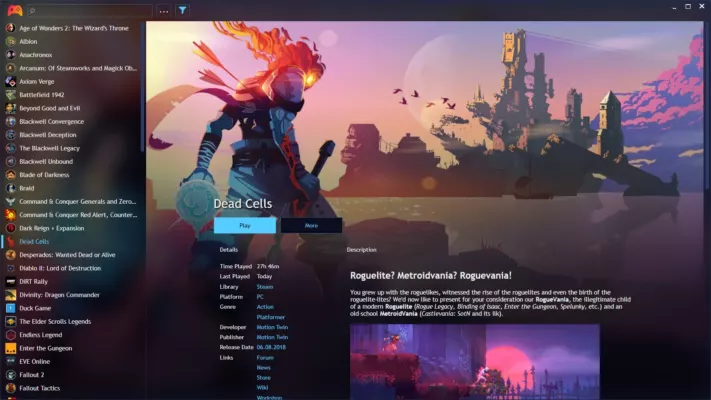
With its intuitive design, advanced plugin system, and custom themes, Playnite provides an elegant, clutter-free experience for organizing, launching, and tracking your games.
Key Features
1. Unified Game Library
Playnite automatically imports and synchronizes your entire collection from multiple platforms. You can also manually add DRM-free titles or emulated games, making it a true all-in-one game hub.
2. Customization and Themes
The software supports custom themes, backgrounds, and layouts, allowing users to personalize every detail of their gaming interface. Whether you prefer a sleek modern look or a retro aesthetic, Playnite adapts to your taste.
3. Plugin and Extension Support
Playnite offers extensive plugin integration, enabling users to add features like achievement tracking, playtime sync, metadata fetching, and even Discord rich presence. Developers can create their own extensions using Playnite’s open API.
4. Game Metadata and Art
It automatically fetches cover art, descriptions, release dates, and ratings from online databases, ensuring your library looks complete and visually appealing.
5. Fullscreen and Desktop Modes
Playnite includes two interface modes:
- Desktop Mode for traditional PC use.
- Fullscreen Mode optimized for controllers and TVs — perfect for a home theater setup.
6. Performance and Privacy
As a fully open-source project, Playnite respects user privacy and contains no ads or telemetry. It’s lightweight and runs efficiently even with large game collections.
What’s New in Version 10.41
- Enhanced plugin manager with auto-updates.
- Improved metadata download from IGDB and Steam.
- Faster library scanning and import process.
- Fixed minor UI glitches and added new theme options.
Why Choose Playnite
Playnite 10.41 stands out from other launchers by offering complete freedom, no restrictions, and no bloatware. It’s ideal for gamers who want a single, clean dashboard for their entire collection — including PC, console, and emulated titles.
Unlike proprietary launchers, Playnite’s open-source nature ensures transparency, customization, and community-driven innovation.
Conclusion
Playnite 10.41 redefines how gamers organize and enjoy their libraries. By merging all platforms under one sleek, customizable launcher, it delivers both convenience and style.
✔ Tested: This software was tested on Windows 10 & Windows 11 and works smoothly without issues.
Frequently Asked Questions
- Is this software free?
Yes, it can be downloaded and used for free. - Does it support Windows 11?
Yes, it works perfectly on Windows 10 and 11. - Is it safe to use?
Yes, the software was scanned and tested before publishing.
Last updated: January 2026