
🎭 Adobe Character Animator 2025 (v25.0.0.46): Real-Time 2D Animation, Redefined
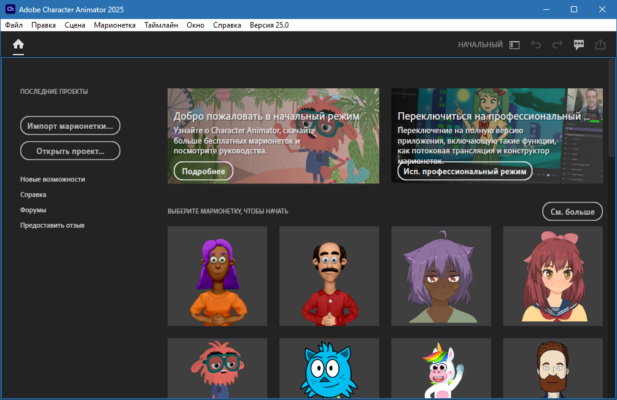
Creating expressive, talking characters used to take hours of keyframing. With Adobe Character Animator 2025 (version 25.0.0.46), you can animate lifelike 2D puppets in real time—using just your webcam and microphone. Whether you’re a YouTuber, educator, streamer, or motion designer, this powerful tool turns your facial expressions and voice into dynamic, responsive animations instantly.
Part of the Adobe Creative Cloud suite, Character Animator 2025 integrates seamlessly with Photoshop, Illustrator, and After Effects, making it the perfect bridge between design and motion.
🌟 What’s New in Version 25.0.0.46?
Adobe’s 2025 release refines performance, stability, and AI-driven features:
- 🎤 Improved Lip Sync Accuracy: Better phoneme detection for clearer mouth movements
- 👁️ Enhanced Eye & Head Tracking: Smoother gaze and head-turn responses
- 🚀 Faster Scene Rendering: Optimized for Apple Silicon (M1/M2/M3) and Windows 11
- 🐞 Bug Fixes: Resolved crashes during multi-track recording and puppet swapping
- 🌓 Dark Mode Polish: Refined UI contrast for long editing sessions
✨ Key Features That Make It Stand Out
🎥 Real-Time Performance Capture
Your face controls the character’s eyes, eyebrows, mouth, and head movements—live. Perfect for streaming, live presentations, or rapid prototyping.
🗣️ Automatic Lip Sync
Speak into your mic, and Character Animator matches your words to realistic mouth shapes—no manual keyframes needed.
🧩 Puppet Rigging Made Simple
Import layered PSD or AI files. Tag body parts (e.g., “Left Eyebrow,” “Mouth”) with intuitive labels—Character Animator does the rigging automatically.
🔄 Scene & Take Management
Record multiple “takes,” switch puppets on the fly, and edit timelines non-destructively—ideal for podcasts or animated series.
🌐 Live Streaming Ready
Output directly to OBS Studio, Zoom, or Streamlabs as a virtual camera—turn your animated avatar into your streaming persona.
🎨 Adobe Ecosystem Integration
- Edit artwork in Photoshop → changes auto-update in Character Animator
- Send final scenes to After Effects for advanced compositing
💼 Who Should Use It?
- Content Creators: Make animated explainers or social videos in minutes
- Educators: Teach with engaging, talking avatars
- Game Developers: Prototype NPC dialogue scenes
- Marketing Teams: Produce branded animated ads quickly
- Indie Animators: Skip months of frame-by-frame work
💡 No animation experience? No problem. If you can talk and move your face—you can animate.
📥 How to Get Adobe Character Animator 2025
Character Animator is available exclusively through Adobe Creative Cloud:
- Open the Creative Cloud desktop app
- Search for “Character Animator”
- Click Install (requires active subscription)
- Launch and start animating with your webcam
🔗 Official Page: https://www.adobe.com/products/character-animator.html
✅ Included in All Apps Plan or available as a single-app subscription ($20.99/month).
💬 Final Thoughts
Adobe Character Animator 2025 (v25.0.0.46) democratizes professional animation. It turns your laptop into a virtual puppet studio—where ideas become moving characters in seconds, not weeks. While it won’t replace frame-by-frame artistry, it’s unmatched for speed, expressiveness, and accessibility.
🎭 Your face. Your voice. Your character—alive.
✔ Tested: This software was tested on Windows 10 & Windows 11 and works smoothly without issues.
Frequently Asked Questions
- Is this software free?
Yes, it can be downloaded and used for free. - Does it support Windows 11?
Yes, it works perfectly on Windows 10 and 11. - Is it safe to use?
Yes, the software was scanned and tested before publishing.
Last updated: January 2026