
Creating a professional website no longer requires deep coding knowledge thanks to WYSIWYG Web Builder 20.2.4. This powerful software allows anyone, from beginners to advanced designers, to build responsive and feature-rich websites quickly. With its drag-and-drop interface and an extensive library of templates, you can design pages exactly how you envision them, without touching a single line of code and buy.
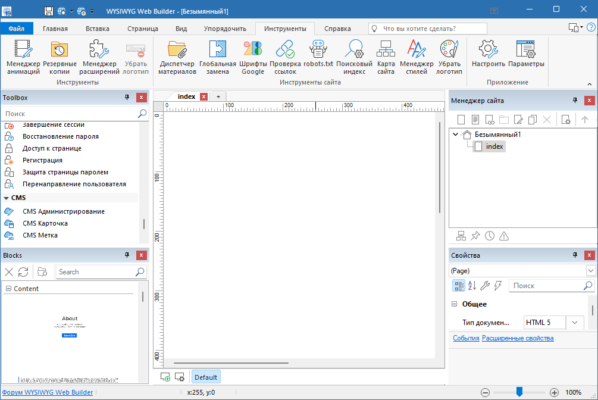
What is WYSIWYG Web Builder?
WYSIWYG stands for “What You See Is What You Get”, which means the page you design inside the editor will look the same when published on the web. Instead of typing HTML, CSS, and JavaScript manually, you can visually create and arrange elements like text, images, videos, forms, and buttons directly on the page.
This makes WYSIWYG Web Builder 20.2.4 an ideal tool for:
Beginners who want to launch a website without coding.
Designers who want full creative freedom.
Small businesses building online stores.
Developers who want to speed up the initial design phase.
Key Features of WYSIWYG Web Builder 20.2.4
1. Drag-and-Drop Website Builder
Simply drag elements onto your canvas and position them exactly where you want. This intuitive workflow reduces design time significantly.
2. Responsive Design Tools
Modern websites must look perfect on desktops, tablets, and mobile devices. WYSIWYG Web Builder provides responsive breakpoints, allowing you to customize layouts for different screen sizes.
3. Huge Template Library
The software includes a wide range of pre-built templates and ready-to-use blocks. These can be customized to match your brand, saving time while maintaining a professional look.
4. E-Commerce Support
Building an online store is simple with built-in shopping cart features and payment integrations such as PayPal. This makes the program suitable for small businesses.
5. SEO and Performance Optimization
Integrated SEO tools help optimize metadata, headings, and site structure. Clean code generation ensures fast loading speeds, which improves search engine rankings.
6. Advanced Customization
For users who want more control, WYSIWYG Web Builder allows adding custom HTML, CSS, and JavaScript. This flexibility bridges the gap between beginners and professional developers.
What’s New in Version 20.2.4?
The latest update brings several improvements and bug fixes:
Enhanced responsive design features for smoother layouts.
Updated template collection with modern styles.
Improved compatibility with Windows 11.
Performance optimizations for faster publishing.
Minor bug fixes and stability improvements.
System Requirements
To run WYSIWYG Web Builder 20.2.4, make sure your system meets the following requirements:
Operating System: Windows 7, 8, 10, or 11 (64-bit recommended)
RAM: Minimum 2GB (4GB recommended)
CPU: Intel/AMD 1 GHz processor or higher
Disk Space: Around 200MB for installation
Display: 1024×768 resolution or higher
Why Choose WYSIWYG Web Builder?
Unlike other website builders that restrict customization, this program gives you complete design freedom. Whether you want a personal blog, a portfolio, or an online store, the software adapts to your needs. Beginners appreciate the simplicity, while advanced users enjoy the flexibility to integrate custom code and third-party scripts.
Conclusion
WYSIWYG Web Builder 20.2.4 is a powerful and versatile solution for anyone who wants to create stunning websites without relying on complex coding. Its combination of drag-and-drop tools, responsive design options, and SEO features make it one of the best desktop web design applications available today.
If you are looking for a fast, reliable, and professional way to build websites, this version is definitely worth exploring and see construction of the website.
✔ Tested: This software was tested on Windows 10 & Windows 11 and works smoothly without issues.
Frequently Asked Questions
- Is this software free?
Yes, it can be downloaded and used for free. - Does it support Windows 11?
Yes, it works perfectly on Windows 10 and 11. - Is it safe to use?
Yes, the software was scanned and tested before publishing.
Last updated: January 2026