Pixelorama 1.1.4: A Free, Powerful Pixel Art Studio for Creators & Game Developers 🖌️✨
Looking for a free, open-source alternative to paid pixel art tools like Aseprite or GraphicsGale? Pixelorama 1.1.4 is a feature-rich, community-driven pixel art editor built with the Godot Engine, offering professional-grade tools for creating sprites, animations, tiles, and game assets—completely free and without restrictions.
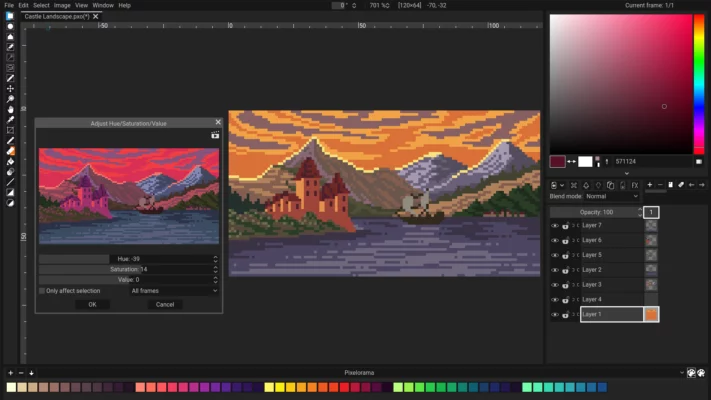
Whether you’re an indie game developer, hobbyist artist, or student learning pixel art, Pixelorama delivers a smooth, intuitive, and distraction-free creative experience.
🎯 Why Choose Pixelorama?
- ✅ 100% free & open-source (MIT license – no hidden costs)
- ✅ Cross-platform: Works on Windows, macOS, Linux, and even Web
- ✅ No telemetry, no ads, no paywalls
- ✅ Built-in animation timeline with onion skinning
- ✅ Lightweight and fast—even on older hardware
Originally created as a demo for the Godot Engine, Pixelorama has evolved into a beloved tool in the indie dev and pixel art communities.
✨ Key Features of Pixelorama 1.1.4
🖌️ 1. Professional Drawing Tools
- Pencil, brush, eraser, line, rectangle, ellipse, and fill tools
- Symmetry drawing (horizontal, vertical, 4-way, radial)
- Custom brush shapes and tile-based brushes
- Zoom up to 6400% for precise pixel control
🎞️ 2. Advanced Animation Support
- Multi-layer timeline with frame management
- Onion skinning (adjust opacity and frame range)
- Play, loop, and preview animations in real time
- Export as GIF, WebP, or PNG sequence
🎨 3. Smart Palette & Color Management
- Create and save custom palettes (supports .gpl format)
- Color picker with hex/RGB input
- Palette swapping for quick theme changes
- Limited palette mode to enforce color constraints
🧩 4. Tilemap & Grid Tools
- Snap to grid for clean pixel alignment
- Tile preview and tileset export
- Perfect for designing game levels or character sheets
📤 5. Flexible Export Options
- Save projects as .pxo (native format)
- Export images as PNG, JPG, BMP
- Export animations as GIF, WebP, or sprite sheets
- Batch export frames for game engines
🛠️ Ideal For:
- Indie game developers creating 2D assets for Godot, Unity, or GameMaker
- Pixel artists crafting characters, icons, or retro-style art
- Educators teaching digital art or game design
- Hobbyists exploring pixel art without financial risk
💡 Pixelorama is especially popular in the Godot community, but works great with any game engine or workflow.
🆚 Pixelorama vs. Popular Alternatives
Pixelorama stands out as the most accessible, ethical, and versatile free option—especially for learners and open-source advocates.
💡 Final Thoughts: Create Freely, Share Openly
Pixelorama 1.1.4 proves that powerful creative tools don’t have to cost money or compromise your privacy. With its clean interface, robust animation features, and true cross-platform support, it’s a fantastic choice for anyone diving into pixel art.
🎨 Your next sprite, animation, or game asset starts here—100% free.
🌐 Official website & download: https://orama-interactive.itch.io/pixelorama
💻 Open-source on GitHub: https://github.com/Orama-Interactive/Pixelorama
✔ Tested: This software was tested on Windows 10 & Windows 11 and works smoothly without issues.
Frequently Asked Questions
- Is this software free?
Yes, it can be downloaded and used for free. - Does it support Windows 11?
Yes, it works perfectly on Windows 10 and 11. - Is it safe to use?
Yes, the software was scanned and tested before publishing.
Last updated: January 2026