
PixiEditor 2.0.1.16 Overview
PixiEditor 2.0.1.16 is a modern and lightweight pixel art editor built for artists, game developers, and digital creators. Designed with speed and precision in mind, it offers a clean interface, powerful tools, and an efficient workflow for crafting stunning pixel-based artwork. Whether you’re designing game sprites, animated tiles, or retro-style illustrations, PixiEditor provides all the essential features you need without unnecessary complexity.
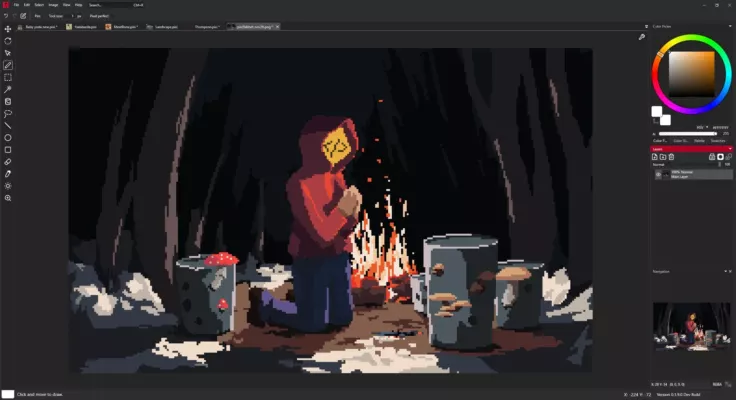
This version introduces improved stability, new editing tools, and faster rendering performance. It’s ideal for professionals seeking control and for beginners looking for an intuitive way to start creating pixel art.
Key Features and Advantages
Intuitive Interface
PixiEditor offers a simple, distraction-free layout that helps artists focus on their creative process. The clean design ensures easy access to brushes, layers, palettes, and selection tools.
Layers and Transparency
Work with multiple layers for complex projects. Manage opacity, blending modes, and transparency to create detailed art with full control over each element.
Animation Support
PixiEditor supports frame-by-frame animation, allowing users to design pixel-based motion graphics and sprite animations directly within the program.
Palette Management
Choose from a wide range of predefined color palettes or create your own custom palette. This helps maintain color consistency across game assets and projects.
Export Options
You can export your work in multiple file formats including PNG, GIF, and BMP. This ensures compatibility with most game engines and editing environments.
Performance and Speed
With hardware acceleration and optimized rendering, PixiEditor delivers a smooth experience even when working on high-resolution projects.
Why Choose PixiEditor 2.0.1.16
PixiEditor stands out because it combines simplicity, power, and flexibility. It bridges the gap between beginner-friendly pixel art tools and professional-level software. Unlike heavy graphic suites, PixiEditor launches instantly, consumes minimal resources, and focuses on what pixel artists truly need — precision and workflow speed.
By using PixiEditor 2.0.1.16, you can:
Design high-quality sprites and game assets
Create smooth pixel animations
Manage color palettes effectively
Export and integrate graphics seamlessly into your game engine
System Requirements
Operating System: Windows 7, 8, 10, 11 (64-bit)
Processor: 1 GHz or faster
RAM: 2 GB minimum
Storage: 200 MB available space
Graphics: DirectX 10 compatible GPU
Final Thoughts
PixiEditor 2.0.1.16 is a must-have tool for anyone involved in pixel art and 2D game development. It balances simplicity with power, offering both casual creators and professionals an efficient way to bring their ideas to life. With continuous updates and community support, PixiEditor continues to grow as one of the best free pixel art tools available today.
If you’re searching for a fast, lightweight, and reliable editor for pixel art, PixiEditor 2.0.1.16 is the perfect choice.
✔ Tested: This software was tested on Windows 10 & Windows 11 and works smoothly without issues.
Frequently Asked Questions
- Is this software free?
Yes, it can be downloaded and used for free. - Does it support Windows 11?
Yes, it works perfectly on Windows 10 and 11. - Is it safe to use?
Yes, the software was scanned and tested before publishing.
Last updated: January 2026