
Secure file transfer is an essential requirement for system administrators, developers, and IT professionals. Whether transferring files to a web server, accessing remote storage, or synchronizing directories, having a reliable tool is critical. WinSCP 6.5.3 is a free, open-source Windows client that supports SFTP, FTP, WebDAV, and SCP, making it one of the most versatile file transfer applications available.
What is WinSCP?
WinSCP (Windows Secure Copy) is a widely used open-source software designed for secure file transfer between a local computer and remote servers. First released in 2000, it has consistently evolved to support modern protocols and deliver a user-friendly interface.
The latest release, WinSCP 6.5.3, offers enhanced stability, new protocol improvements, and bug fixes while maintaining its reputation as a trusted tool for IT professionals and casual users alike.
Key Features of WinSCP 6.5.3
1. Multi-Protocol Support
WinSCP supports multiple protocols including SFTP, FTP, FTPS, SCP, and WebDAV, ensuring compatibility with a wide range of servers.
2. Graphical User Interface (GUI)
The software provides an intuitive GUI with two interface styles:
Commander Interface (dual-pane, similar to Total Commander)
Explorer Interface (single-pane, similar to Windows Explorer)
3. Secure File Transfer
Using SSH encryption for SFTP and SCP, WinSCP ensures data integrity and confidentiality during transfers.
4. Synchronization Tools
Users can synchronize local and remote directories automatically or manually, making it ideal for backups and deployments.
5. Integrated Text Editor
Edit files directly on remote servers using the built-in text editor or configure external editors for convenience.
6. Script and Command-Line Support
WinSCP allows automation through command-line scripts and .NET assembly, enabling seamless integration with custom workflows.
7. Session Management
Save and manage multiple sessions with stored credentials, making frequent server connections quick and efficient.
What’s New in Version 6.5.3?
Bug fixes for improved protocol stability.
Enhanced security updates to meet the latest standards.
Performance improvements for SFTP and FTP transfers.
Updated compatibility with modern Windows versions and servers.
Minor user interface refinements for smoother navigation.
Benefits of Using WinSCP
For Developers
WinSCP simplifies uploading code, synchronizing project files, and managing deployments securely.
For System Administrators
With protocol flexibility and script automation, administrators can handle routine server tasks efficiently.
For Businesses
Secure file transfers help maintain data compliance, reduce risk, and improve collaboration across remote teams.
For Everyday Users
Even non-technical users can benefit from the clean interface for secure file sharing with minimal setup.
How to Use WinSCP 6.5.3
Step 1: Installation
Download and install WinSCP 6.5.3 from the official website. Choose the preferred interface (Commander or Explorer).
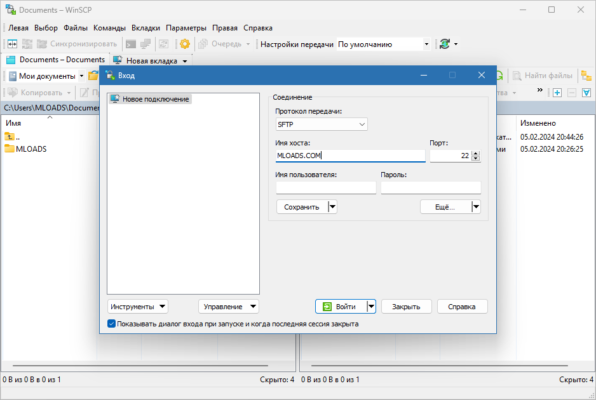
Step 2: Create a New Session
Enter your server details (hostname, port, username, and password/SSH key). Save the session for future use.
Step 3: Transfer Files
Drag and drop files between the local and remote panels to upload or download.
Step 4: Automate Tasks
Use scripting or command-line support to schedule automated transfers and synchronizations.
Conclusion
WinSCP 6.5.3 remains one of the best free and open-source tools for secure file transfer on Windows. With its multi-protocol support, robust security features, synchronization tools, and automation capabilities, it is suitable for both beginners and advanced users. Whether you are a developer, system administrator, or business user, WinSCP provides a reliable and secure solution for managing remote files.
✔ Tested: This software was tested on Windows 10 & Windows 11 and works smoothly without issues.
Frequently Asked Questions
- Is this software free?
Yes, it can be downloaded and used for free. - Does it support Windows 11?
Yes, it works perfectly on Windows 10 and 11. - Is it safe to use?
Yes, the software was scanned and tested before publishing.
Last updated: January 2026