
Introduction
Remote access and secure file transfer are critical needs in modern IT environments. Whether you’re a system administrator, developer, or security professional, having the right SSH client ensures stability and data protection. Bitvise SSH Client 9.47 is a powerful Windows SSH client that combines security, speed, and ease of use for remote administration and file transfer.
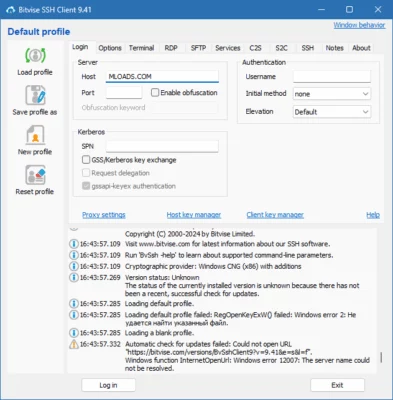
What is Bitvise SSH Client 9.47?
Bitvise SSH Client is a professional tool for establishing secure SSH (Secure Shell) connections. It provides terminal emulation, secure file transfer via SFTP, and tunneling capabilities for network communication.
The 9.47 release introduces improved performance, bug fixes, and enhanced support for modern Windows versions, ensuring compatibility and security for IT professionals.
Key Features of Bitvise SSH Client 9.47
Secure SSH Connections: Encrypted remote access to servers using industry-standard protocols.
Graphical SFTP File Transfer: Drag-and-drop interface for secure file uploads and downloads.
Terminal Access: Full-featured command-line terminal for system administration.
Dynamic Port Forwarding: Secure tunneling to protect network communications.
Public Key Authentication: Strong authentication options for added security.
Scriptable Command-Line Client: Automate SSH and SFTP tasks with BvSsh.exe.
Compression Support: Improve transfer speed on slower networks.
Custom Profiles: Save multiple server configurations for quick access.
Windows Integration: Runs smoothly on all modern Windows versions.
Free for Personal and Commercial Use: Unlike many SSH clients, Bitvise offers its client free of charge.
System Requirements
To use Bitvise SSH Client 9.47, your system should meet the following requirements:
OS: Windows 7, 8, 10, 11 (32/64-bit)
Processor: Intel/AMD dual-core or better
RAM: 1 GB minimum (2 GB recommended)
Storage: 50 MB free disk space
Network: Internet connection for remote sessions
How to Download and Install Bitvise SSH Client 9.47
Visit the official Bitvise website.
Download the installer for version 9.47.
Run the setup file and complete installation.
Launch Bitvise SSH Client from the Start menu.
Enter server details (hostname, port, username, authentication method).
Connect securely to the server and begin managing files or running commands.
Why Use Bitvise SSH Client 9.47?
While there are many SSH clients available for Windows, Bitvise stands out for its combination of features, performance, and cost. Unlike PuTTY, which is minimalistic, Bitvise provides a user-friendly graphical interface with built-in SFTP support, making it ideal for users who prefer convenience.
It is especially useful for:
System Administrators: Securely managing remote servers.
Developers: Accessing development environments via SSH.
Security Experts: Setting up encrypted tunnels and monitoring sessions.
Enterprises: Using a free, reliable, and stable SSH client across multiple machines.
Conclusion
Bitvise SSH Client 9.47 is one of the most reliable and secure SSH clients available for Windows. With features like terminal access, SFTP file transfers, tunneling, and automation, it provides a complete solution for remote administration and secure communication.
Download Bitvise SSH Client 9.47 today to experience fast, secure, and user-friendly SSH connections on Windows.
✔ Tested: This software was tested on Windows 10 & Windows 11 and works smoothly without issues.
Frequently Asked Questions
- Is this software free?
Yes, it can be downloaded and used for free. - Does it support Windows 11?
Yes, it works perfectly on Windows 10 and 11. - Is it safe to use?
Yes, the software was scanned and tested before publishing.
Last updated: January 2026