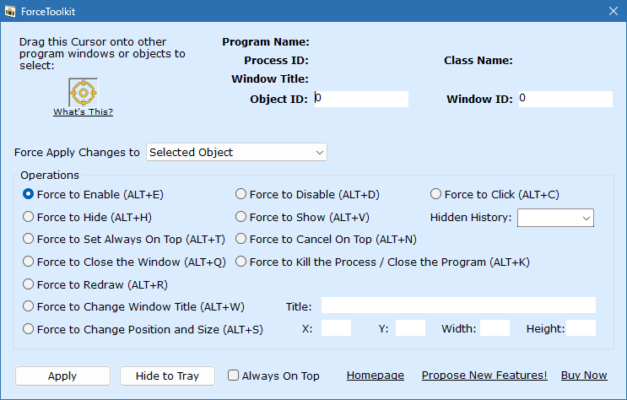
Managing open applications on Windows can sometimes be frustrating, especially when a program becomes unresponsive or restricts user control. ForceToolkit 1.2.3 is a lightweight yet powerful utility designed for developers, IT professionals, and advanced users who need complete control over Windows application windows. With its advanced functions, ForceToolkit allows you to force-close, hide, move, or modify windows in ways that standard Windows tools cannot and buy.
🚀 Why Choose ForceToolkit 1.2.3?
Full Window Control
Unlike the built-in Windows task manager, ForceToolkit provides advanced options for manipulating program windows, making it a valuable tool for both developers and power users.
Lightweight and Efficient
The program is compact, consumes minimal system resources, and runs efficiently in the background, ready to be used whenever needed.
Essential for Developers & Testers
ForceToolkit is especially useful for software developers who need to test UI behaviors, modify window states, and troubleshoot unresponsive programs.
🔑 Key Features of ForceToolkit 1.2.3
1. Force-Close Windows
Instantly close unresponsive or locked applications.
Bypass “Access Denied” errors in many cases.
2. Modify Window Properties
Change window titles for testing and customization.
Enable or disable window buttons like minimize, maximize, or close.
3. Hide or Show Windows
Temporarily hide active windows without closing them.
Restore hidden windows at any time.
4. Resize & Move Windows
Adjust window positions and dimensions manually.
Force apps to open in custom locations.
5. Developer Tools
Inspect and manipulate windows for debugging.
Useful for UI/UX testing and quality assurance.
📌 What’s New in Version 1.2.3?
Improved stability when handling unresponsive programs.
Enhanced compatibility with modern Windows versions.
Optimized resource usage for smoother performance.
Minor bug fixes and interface improvements.
🖥 System Requirements
OS: Windows 7, 8, 10, 11
RAM: 2 GB minimum
Disk Space: ~10 MB
Processor: Intel/AMD dual-core or higher
🛠 Who Should Use ForceToolkit 1.2.3?
Developers 👨💻 – for testing, debugging, and customizing application behavior.
IT Support Teams 🖥 – to manage and troubleshoot problematic software.
Advanced Users ⚡ – who want more control over their Windows environment.
QA Testers 🧪 – to simulate window behaviors and identify UI issues.
✅ Final Verdict
ForceToolkit 1.2.3 is a practical utility for anyone who needs advanced control over Windows applications. Whether you want to force-close an unresponsive program, adjust window properties, or test software interfaces, ForceToolkit delivers reliable tools in a lightweight package. For developers, IT professionals, and power users, it’s a must-have addition to the Windows toolkit.
✔ Tested: This software was tested on Windows 10 & Windows 11 and works smoothly without issues.
Frequently Asked Questions
- Is this software free?
Yes, it can be downloaded and used for free. - Does it support Windows 11?
Yes, it works perfectly on Windows 10 and 11. - Is it safe to use?
Yes, the software was scanned and tested before publishing.
Last updated: January 2026