
FanControl 230 is a versatile and user-friendly application designed to give you complete control over your computer’s cooling system. With this tool, you can monitor temperatures, adjust fan speeds, and create custom fan curves for both CPU and GPU cooling.
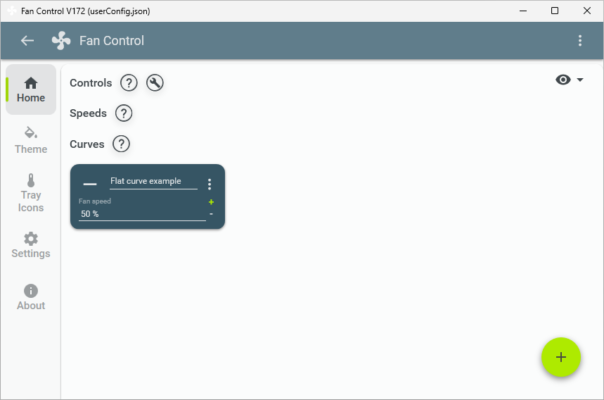
Whether you’re aiming for silent operation during light tasks or maximum cooling during heavy gaming sessions, FanControl 230 lets you fine-tune your cooling system to suit your needs. Its real-time monitoring and intuitive interface make it ideal for both beginners and advanced users.
⚡ Key Benefits
Custom Fan Curves – Tailor cooling performance to match system load.
Noise Reduction – Keep your PC quiet during low workloads.
Temperature Monitoring – Track CPU, GPU, and motherboard temps in real-time.
Multi-Fan Support – Control multiple fans across different zones.
Free and Lightweight – Runs efficiently without hogging system resources.
🚀 What’s New in Version 230
Improved hardware compatibility for latest motherboards and GPUs
Enhanced fan curve editor with smoother transitions
Optimized temperature polling for more accurate readings
Bug fixes for fan detection on certain systems
Updated UI for better usability and customization
🔧 Core Features
✅ Real-Time Monitoring
Displays live temperature readings for critical hardware components.
✅ Dynamic Fan Control
Automatically adjusts fan speed based on temperature thresholds.
✅ Multi-Device Support
Works with CPU fans, GPU fans, and additional chassis fans.
✅ Profile Management
Create and save different cooling profiles for gaming, productivity, or silence.
✅ Easy Setup
Simple installation and quick hardware detection for immediate use.
🛠 Technical Details
Software Name: FanControl
Version: 230
Developer: Rem0o (open-source)
Category: System Utilities / Hardware Monitoring
Supported OS: Windows 10/11 (64-bit)
Size: ~5MB
License: Free (Open Source)
📥 Installation Guide
Download FanControl 230 from the official project page.
Extract the files and run the executable (no installation required).
Allow the software to detect your fans and sensors automatically.
Create or modify fan curves according to your cooling needs.
Save your settings and enjoy optimized cooling performance.
🧠 Final Thoughts
FanControl 230 is an excellent solution for users who want precise control over their PC cooling system. Its blend of powerful customization options and a simple interface makes it perfect for gamers, content creators, and anyone who values both performance and quiet operation.
With support for multiple fans, real-time monitoring, and easy profile management, FanControl 230 ensures your system stays cool and efficient under any workload.
✔ Tested: This software was tested on Windows 10 & Windows 11 and works smoothly without issues.
Frequently Asked Questions
- Is this software free?
Yes, it can be downloaded and used for free. - Does it support Windows 11?
Yes, it works perfectly on Windows 10 and 11. - Is it safe to use?
Yes, the software was scanned and tested before publishing.
Last updated: January 2026