
FinePrint Pro 12.17: Smarter Printing, Less Waste, Better Control
Tired of wasting paper, ink, and time on inefficient printing? FinePrint Pro 12.17 is a powerful virtual printer for Windows that transforms how you print and manage documents. Whether you’re generating reports, contracts, or multi-page PDFs, FinePrint Pro helps you optimize, customize, and reduce costs—before a single drop of ink hits the page.
Why Professionals Trust FinePrint Pro 12.17
Unlike standard print dialogs, FinePrint Pro acts as an intelligent intermediary between your application and printer—giving you full control over layout, content, and output format.
Key Benefits at a Glance
- ✅ Reduce paper use by up to 75% with multi-page layouts
- ✅ Convert any document to PDF with one click
- ✅ Remove ads, headers, or blank pages automatically
- ✅ Add watermarks, stamps, or custom footers
- ✅ Preview and edit before printing
Core Features of FinePrint Pro 12.17
Intelligent Page Layout & Scaling
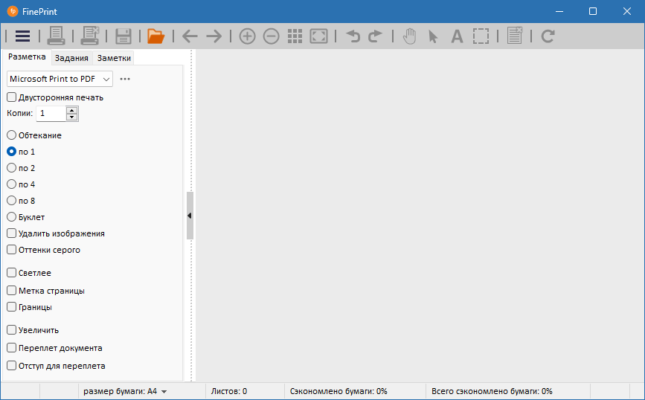
Print 2, 4, or even 8 pages per sheet to save paper. FinePrint automatically scales and arranges content while preserving readability.
PDF Creation & Optimization
FinePrint Pro doubles as a high-quality PDF printer. Generate compact, searchable PDFs from any Windows application—ideal for archiving or sharing.
Content Cleanup Tools
Automatically:
- Delete blank pages
- Remove web ads or banners
- Suppress unwanted headers/footers
- Skip pages containing specific keywords
Custom Branding & Security
Add professional touches like:
- Confidential watermarks
- Company logos
- Page numbers or date stamps
- Bates numbering for legal documents
Print Job Management
Preview your entire print job in a single window. Rearrange, delete, or duplicate pages before sending to the printer—no more wasted reprints.
How to Use FinePrint Pro in 3 Simple Steps
Step 1: Print to FinePrint
From any application (Word, browser, email), choose “FinePrint” as your printer.
Step 2: Optimize Your Document
Use the preview window to:
- Adjust layout (1–8 pages per sheet)
- Apply watermarks
- Remove unwanted content
- Merge multiple print jobs
Step 3: Output or Print
Click Print to send to a physical printer—or choose Save as PDF to create a digital copy instantly.
FinePrint Pro vs. Standard Windows Printing
FinePrint Pro turns printing from a passive task into an active optimization step.
Ideal For:
- Law firms – Bates numbering, redaction prep
- Students – Save paper on research printouts
- Businesses – Reduce supply costs & go greener
- Remote workers – Create clean PDFs for clients
Final Thoughts
FinePrint Pro 12.17 isn’t just a printer driver—it’s a productivity and sustainability tool. By giving you unprecedented control over what gets printed (or saved as PDF), it cuts waste, enhances professionalism, and streamlines document workflows.
Print smarter. Waste less. Impress more.
- 🌐 Official website: https://www.fineprint.com
- 💻 Compatible with Windows 10 & 11 (64-bit)
- 💼 Free trial available; Pro license includes lifetime updates
✔ Tested: This software was tested on Windows 10 & Windows 11 and works smoothly without issues.
Frequently Asked Questions
- Is this software free?
Yes, it can be downloaded and used for free. - Does it support Windows 11?
Yes, it works perfectly on Windows 10 and 11. - Is it safe to use?
Yes, the software was scanned and tested before publishing.
Last updated: January 2026