
Toolwiz Time Freeze 4.3.1.5000: Your System’s Safety Net—Every Reboot Resets Everything 🔄💻
Is your computer constantly cluttered with temporary files, unwanted software changes, or accidental modifications? Toolwiz Time Freeze 4.3.1.5000 creates a protective layer over your Windows system, making all changes temporary—so your PC reverts to its original state with every restart.
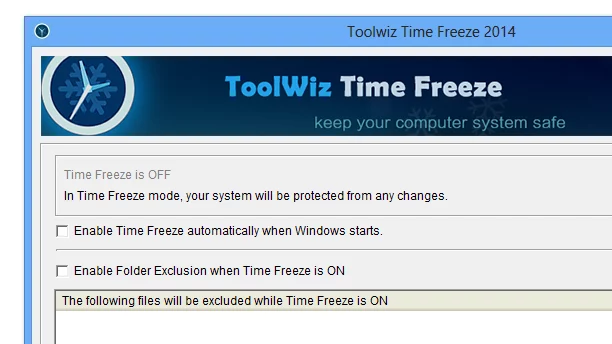
Think of it as a reset button for your entire system—ideal for public computers, testing environments, or any situation where you want to keep your system clean and secure.
🎯 Why Use Toolwiz Time Freeze?
- ✅ Reverts all changes on reboot – files, programs, settings
- ✅ Protects against malware – infections disappear after restart
- ✅ No permanent damage – safe to experiment or install risky software
- ✅ Lightweight & runs in background – minimal performance impact
- ✅ Easy to activate/deactivate – toggle protection on demand
Perfect for public computers, schools, testing environments, or cautious users who want system stability.
✨ Key Features of Version 4.3.1.5000
🛡️ 1. System Protection Layer
- Creates a virtual shield over your system drive
- All writes go to a temporary layer (not the real disk)
- Original system remains untouched
⚡ 2. Instant Reversion on Restart
- After reboot, all changes are erased
- System returns to the **exact state when Time Freeze was activated
- No cleanup needed – automatic and instant
🧪 3. Safe Testing Environment
- Install and test any software without risk
- Experiment with system settings
- Browse the web without worrying about traces
🚫 4. Malware & Bloatware Defense
- Prevents permanent installation of malicious software
- Stops unwanted toolbars or adware from persisting
- No need for antivirus scans after risky sessions
⚙️ 5. Flexible Configuration
- Enable/Disable protection with one click
- Choose which drives to protect
- Whitelist specific files or folders to keep changes
🛠️ How It Works in 3 Steps
- 🔒 Activate: Turn on Time Freeze before making changes.
- 💻 Use: Install software, change settings, or browse freely.
- 🔄 Restart: After reboot, your system is clean and unchanged!
💡 Tip: Use Time Freeze when testing new software or working on sensitive systems.
🆚 Time Freeze vs. Traditional System Restore
Time Freeze offers faster, more reliable protection with less setup.
💡 Final Thoughts: Keep Your System Pristine
Toolwiz Time Freeze 4.3.1.5000 gives you complete control over your system’s state—ensuring it stays clean, secure, and unchanged no matter what you do. It’s like having a reset button for your entire computer.
⏱️ Freeze time. Protect your PC. Stay safe.
🌐 Official website: https://www.toolwiz.com
💻 Compatible with Windows 10 & 11 (64-bit)
✔ Tested: This software was tested on Windows 10 & Windows 11 and works smoothly without issues.
Frequently Asked Questions
- Is this software free?
Yes, it can be downloaded and used for free. - Does it support Windows 11?
Yes, it works perfectly on Windows 10 and 11. - Is it safe to use?
Yes, the software was scanned and tested before publishing.
Last updated: January 2026