
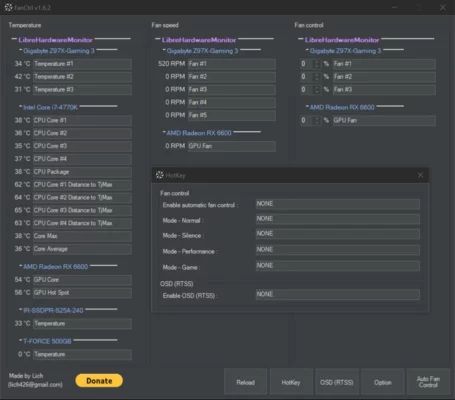
FanCtrl 1.7.5 is a lightweight yet powerful tool that allows users to monitor and adjust their computer’s fan speeds. Proper cooling is essential for PC performance and hardware longevity, and FanCtrl makes it easy to balance temperature management with noise reduction.
Key Features of FanCtrl 1.7.5
1. Real-Time Fan Monitoring
Keep track of RPM values from all connected fans, ensuring your system runs at safe temperatures.
2. Custom Fan Profiles
Set custom speed curves based on CPU or GPU temperature for automatic and efficient cooling.
3. Multi-Device Support
Supports most modern motherboards and fan controllers, giving flexibility across different PC builds.
4. Lightweight & Easy to Use
With a minimal interface, FanCtrl provides all necessary functions without unnecessary complexity.
5. Startup Integration
Option to run automatically with Windows, ensuring cooling profiles are applied instantly.
6. Silent Mode & Performance Mode
Switch between quiet operation for daily tasks or high-performance cooling during gaming and heavy workloads.
Benefits of Using FanCtrl
Extends hardware lifespan by preventing overheating.
Reduces unnecessary fan noise with smart profiles.
Gives complete control over PC cooling performance.
Lightweight tool with minimal system resource usage.
System Requirements
OS: Windows 11, 10, 8.1, 7
RAM: 1GB minimum
Processor: Intel/AMD dual-core or higher
Motherboard: Must support fan monitoring/control via sensors
Conclusion
For users who want precise control over their PC cooling system, FanCtrl 1.7.5 is an excellent solution. With its customizable fan profiles, real-time monitoring, and simple interface, it provides the perfect balance between performance and silence.
✔ Tested: This software was tested on Windows 10 & Windows 11 and works smoothly without issues.
Frequently Asked Questions
- Is this software free?
Yes, it can be downloaded and used for free. - Does it support Windows 11?
Yes, it works perfectly on Windows 10 and 11. - Is it safe to use?
Yes, the software was scanned and tested before publishing.
Last updated: January 2026