ExplorerPatcher 26100.4946.69.5: Reclaim Your Windows 11 Experience 🖥️✨
Love the power of Windows 11 but miss the classic Start menu, centered taskbar, or full-featured File Explorer? ExplorerPatcher 26100.4946.69.5 is a free, open-source utility that lets you customize and restore familiar Windows UI elements—giving you the best of both worlds.
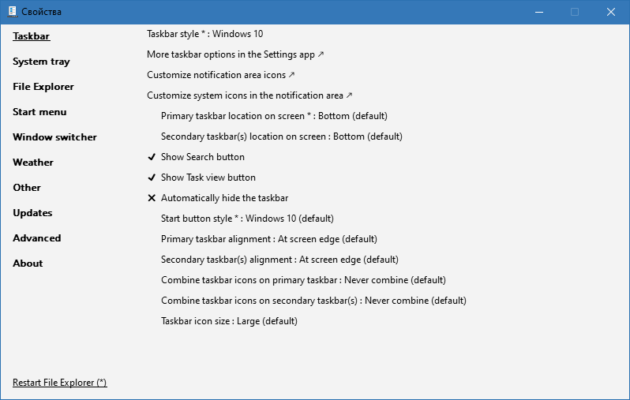
This lightweight tool patches Windows Explorer on-the-fly, allowing you to personalize your desktop to match your workflow and preferences.
🎯 Why Use ExplorerPatcher?
- ✅ Restore the classic Start menu (with transparency, icons, etc.)
- ✅ Center the taskbar clock and use classic icons
- ✅ Re-enable File Explorer ribbon and address bar layout
- ✅ Hide or customize widgets, Copilot button, and other UI elements
- ✅ Free & open-source – no cost or bloatware
- ✅ Reversible – easily restore default settings
Perfect for users who want Windows 11 under the hood with Windows 10-style controls.
✨ Key Features of Version 26100.4946.69.5
🏠 1. Classic Start Menu
- Replace the new Start menu with a Windows 10-style layout
- Keep live tiles or use a static menu
- Apply custom backgrounds and transparency effects
📟 2. Taskbar Customization
- Center the taskbar clock (like Windows 10)
- Restore classic system tray and icon spacing
- Hide or show the Copilot button and widgets icon
- Enable multi-monitor taskbars (optional)
📁 3. File Explorer Enhancements
- Re-enable the classic ribbon (like Windows 7/10)
- Switch to the address bar layout instead of search bar
- Add back the Quick Access icons (optional)
🎨 4. Advanced UI Tweaks
- Disable rounded corners (if desired)
- Modify context menus (e.g., add “Take Ownership”)
- Enable God Mode shortcuts
- Adjust power plans and system settings directly from the UI
⚙️ 5. Safe & Configurable
- Runs in the background with minimal resource usage
- Settings stored in registry (easy to reset)
- Portable version available
- Open-source – community-audited for safety
🛠️ How to Customize Windows 11 in 3 Steps
- 📥 Download & Install: Get ExplorerPatcher from the official GitHub repo.
- ⚙️ Configure: Use the settings panel to choose your desired UI changes.
- 🔄 Restart Explorer: Apply changes instantly (no full reboot needed).
💡 Tip: Use the “Restore Default Settings” option if you want to return to stock Windows 11.
🆚 ExplorerPatcher vs. Stock Windows 11
ExplorerPatcher provides the flexibility Microsoft didn’t, without replacing the OS.
⚠️ Important Notes
- Always download from the official GitHub page to avoid malware
- Compatible with Windows 11 only (does not work on Windows 10)
- Updates to Windows may temporarily break ExplorerPatcher until updated
- Use at your own risk – modifying system UI can sometimes cause instability (though rare with EP)
💡 Final Thoughts: Make Windows 11 Yours
ExplorerPatcher 26100.4946.69.5 empowers users to take control of their desktop environment. Whether you prefer the familiarity of Windows 10 or want to tweak Windows 11 to perfection, it offers the tools to customize your experience.
🪟 Customize. Control. Enjoy.
🌐 Official GitHub repository: https://github.com/valinet/ExplorerPatcher
💻 Windows 11 only (32-bit & 64-bit). Always verify the source.
✔ Tested: This software was tested on Windows 10 & Windows 11 and works smoothly without issues.
Frequently Asked Questions
- Is this software free?
Yes, it can be downloaded and used for free. - Does it support Windows 11?
Yes, it works perfectly on Windows 10 and 11. - Is it safe to use?
Yes, the software was scanned and tested before publishing.
Last updated: January 2026