Managing files efficiently is one of the most important tasks for any Windows user. The default Windows File Explorer offers basic features, but many power users and professionals need more flexibility, speed, and control. Total Commander 11.56 is a powerful file manager that provides a dual-panel interface, advanced search, file compression, FTP support, and countless plugins to enhance productivity. This latest version brings performance improvements, bug fixes, and extended compatibility with modern Windows systems and buy.
Why Choose Total Commander 11.56?
Dual-Panel Navigation
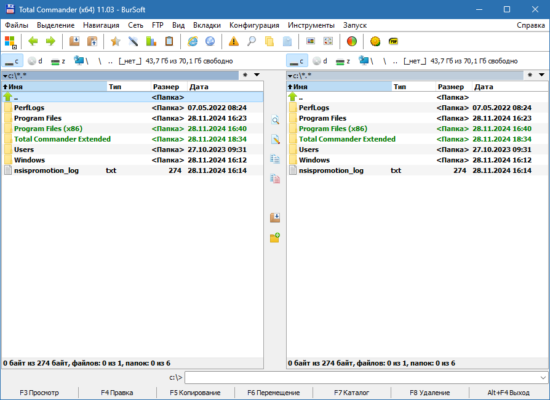
Unlike the default file explorer, Total Commander offers a two-panel interface that allows you to copy, move, and compare files side by side. This makes it much faster to organize folders and transfer data between directories.
Enhanced File Operations
Total Commander 11.56 supports batch operations, background transfers, and error handling during file copy or move. This saves time when working with large amounts of data.
Built-in File Compression and Extraction
The software supports popular formats such as ZIP, RAR, 7Z, TAR, GZ, and more. You don’t need third-party compression tools because Total Commander integrates archiving and extraction directly into the interface.
Key Features of Total Commander 11.56
1. Advanced Search
Finding files on large hard drives can be challenging. Total Commander includes a powerful search tool with filters for file type, size, date, and even inside text content.
2. FTP and Cloud Support
You can connect to FTP servers and manage files online directly from the application. With plugins, users can even access cloud storage services like Google Drive or Dropbox.
3. Customization and Plugins
Total Commander is known for its extensive customization options. Users can add new toolbar buttons, assign hotkeys, and install plugins for additional functionality. Plugins expand features such as image viewing, file comparison, and database browsing.
4. File Synchronization
The synchronization tool helps keep folders updated across different drives or devices. This is especially useful for backups and mirroring important data.
5. Tabbed Browsing
Just like modern web browsers, Total Commander offers tabbed navigation, allowing users to open multiple directories at once and switch between them quickly.
What’s New in Version 11.56?
Total Commander 11.56 introduces small but important refinements:
Improved support for Windows 11 updates.
Faster file copy engine for large directories.
Enhanced stability when working with network drives.
Bug fixes for FTP and file synchronization features.
Updated plugin compatibility.
These updates make the software more reliable and efficient for both casual users and IT professionals.
Benefits for Productivity
Using Total Commander 11.56 can significantly boost your workflow:
Save time with dual-panel navigation and quick shortcuts.
Reduce errors by verifying file transfers with built-in comparison tools.
Increase efficiency by managing archives, FTP servers, and cloud storage from one place.
Stay organized with customizable layouts and keyboard shortcuts.
Conclusion
Total Commander 11.56 remains one of the most powerful file managers for Windows. Whether you are a student, developer, IT professional, or casual user, its advanced features, plugins, and customization options provide a level of control that Windows File Explorer cannot match. If you want faster, safer, and more organized file management, upgrading to Total Commander 11.56 is a smart choice.
✔ Tested: This software was tested on Windows 10 & Windows 11 and works smoothly without issues.
Frequently Asked Questions
- Is this software free?
Yes, it can be downloaded and used for free. - Does it support Windows 11?
Yes, it works perfectly on Windows 10 and 11. - Is it safe to use?
Yes, the software was scanned and tested before publishing.
Last updated: January 2026