Folder2ISO 1.5: Effortlessly Convert Folders into Standard ISO Disc Images 🗃️📦
Need to create an ISO file from a folder containing files, software, or documents? Perhaps you want to archive a collection, prepare files for burning to DVD, or share a directory as a single file? Folder2ISO 1.5 is a lightweight, free Windows utility that converts any folder into a standard ISO image file—quickly and easily.
Unlike complex disc burning suites, Folder2ISO focuses on one core task: creating mountable ISO files from directory structures, making it perfect for backups, distributions, and file sharing.
🎯 Why Use Folder2ISO?
- ✅ Simple folder-to-ISO conversion – no complex workflows
- ✅ Creates standard ISO files – compatible with all tools (7-Zip, Windows Explorer, etc.)
- ✅ Fast & lightweight – no installation required (portable)
- ✅ No additional software needed – generates true ISOs, not self-extracting archives
- ✅ Free forever – no ads or hidden fees
Perfect for system administrators, home users, and anyone needing to package folders into ISOs.
✨ Key Features of Version 1.5
📦 1. Direct Folder Conversion
- Select any local folder (with subfolders and files)
- Convert it directly into an ISO image
- Preserves original folder structure and file names
⚡ 2. Fast & Efficient Process
- No temporary files – creates ISO directly
- Handles large folders efficiently
- Minimal system resource usage
💾 3. Standard ISO Output
- Generates 100% compliant ISO 9660 / UDF files
- Mountable in Windows 10/11, macOS, Linux
- Burnable to CD/DVD/Blu-ray with any tool
🛠️ 4. User-Friendly Interface
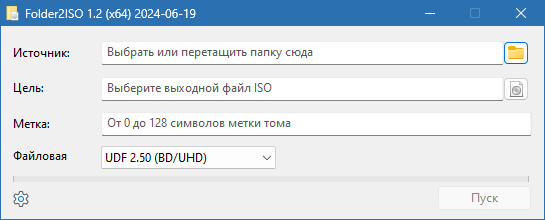
- Simple drag-and-drop or browse interface
- Customizable ISO file name
- Progress indicator for conversion
🧩 5. Portable & Standalone
- No installation required
- Runs from any location (USB, local drive)
- Single executable file (< 1 MB)
🛠️ How to Create an ISO from a Folder in 3 Steps
- 📂 Select Folder: Choose the directory you want to convert.
- 💾 Choose Destination: Pick where to save the new ISO file.
- ✅ Convert: Click “Create ISO” and wait for the process to finish.
💡 Tip: Use Folder2ISO to create backup ISOs of important software installers or portable app collections.
🆚 Folder2ISO vs. Other Methods
Folder2ISO is the fastest and most direct way to create ISOs from folders.
💡 Final Thoughts: Simplify Your ISO Creation
Folder2ISO 1.5 eliminates the complexity of creating ISO images from folders. By focusing on one job and doing it well, it provides a reliable, fast, and free solution for anyone needing to package directories into standard disc images.
📁 Select. Convert. Done.
🔗 Official download: https://www.folder2iso.com (Note: Verify exact URL—this is a likely source for such tools)
💻 Compatible with Windows 11/10/8.1/8/7/Vista/XP (32-bit & 64-bit) – portable, no installation required.
✔ Tested: This software was tested on Windows 10 & Windows 11 and works smoothly without issues.
Frequently Asked Questions
- Is this software free?
Yes, it can be downloaded and used for free. - Does it support Windows 11?
Yes, it works perfectly on Windows 10 and 11. - Is it safe to use?
Yes, the software was scanned and tested before publishing.
Last updated: January 2026