
Password Safe 3.68: Your Personal Encrypted Password Vault 🖥️✨
Managing multiple online accounts and passwords securely can be a daunting task. Reusing passwords or storing them in plain text is risky. Password Safe 3.68 is a free, open-source password manager that provides a secure, encrypted database to store, organize, and manage all your usernames, passwords, and other sensitive information behind a single master password.
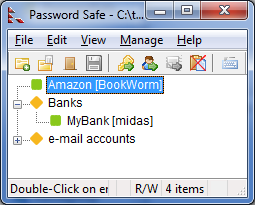
Whether you’re looking to improve your online security, simplify logins, or organize your credentials, Password Safe offers a reliable, local solution.
🎯 Why Use Password Safe?
- ✅ Strong Encryption: Uses AES (Advanced Encryption Standard) to protect your data
- ✅ Completely Free & Open-Source: No cost, community-driven development
- ✅ Offline Storage: Your password database is stored locally on your PC
- ✅ No Internet Required: Works entirely offline for maximum security
- ✅ Customizable Fields: Store usernames, passwords, URLs, notes, and more
- ✅ Auto-Type & Clipboard Clearing: Quickly fill login forms and clear sensitive data from clipboard
Perfect for individuals seeking a secure, private way to manage their passwords without relying on cloud services.
✨ Key Features of Version 3.68
🔐 1. Robust Security
- AES-256 encryption for the password database
- Master password (and optional key file) to unlock the vault
- Automatic database locking after a period of inactivity
- Secure password generation for creating strong, unique passwords
📋 2. Password Management
- Store usernames, passwords, URLs, and notes for each entry
- Organize entries using groups and sub-groups
- Search and filter your password list easily
- Auto-Type feature to fill login forms automatically
🧹 3. Privacy & Safety Features
- Clipboard automatically clears after pasting a password
- Password history tracking to see old passwords
- Password expiration dates to prompt updates
- Backup and restore functionality for your database
⚙️ 4. Customization & Usability
- Custom fields for storing additional information
- Password quality reporting
- Import/Export from/to various formats (CSV, etc.)
- Lightweight and fast application
🛠️ Ideal For:
- Privacy-Conscious Users: Wanting local, offline password storage
- Individuals: Managing personal accounts and credentials
- Anyone: Looking for a free, open-source password manager
- Users Preferring Local Control: Over cloud-based solutions
💡 Tip: Use the password generator to create strong, unique passwords for new accounts and avoid reusing passwords.
🆚 Password Safe vs. Other Password Managers
Password Safe provides strong security and privacy with a local, offline focus.
⚠️ Important Notes
- Your password database file is the only copy of your data. Keep backups in secure locations.
- Always use a strong, unique master password.
- Compatible with Windows (32-bit & 64-bit).
- The database file can be stored on a USB drive for portability (ensure it’s secure).
💡 Final Thoughts: Secure Your Passwords Locally
Password Safe 3.68 is a reliable and secure tool for anyone wanting to manage their passwords offline. By providing strong encryption and a simple interface, it helps you maintain good password hygiene without sacrificing privacy or relying on cloud services.
🔐 Store. Encrypt. Secure. Locally.
🌐 Official website: https://pwsafe.org (Note: Verify exact page for Password Safe 3.68)
💻 Compatible with Windows (32-bit & 64-bit), macOS, and Linux (via compatibility layers or community ports).
✔ Tested: This software was tested on Windows 10 & Windows 11 and works smoothly without issues.
Frequently Asked Questions
- Is this software free?
Yes, it can be downloaded and used for free. - Does it support Windows 11?
Yes, it works perfectly on Windows 10 and 11. - Is it safe to use?
Yes, the software was scanned and tested before publishing.
Last updated: January 2026