
🖼️ ImageCacheViewer 1.33 – Browse and Extract Cached Browser Images
ImageCacheViewer 1.33 is a free, lightweight utility developed by NirSoft that lets you view all images stored in your web browser’s cache. Whether you use Chrome, Firefox, Edge, or Internet Explorer, this tool scans your cache folders and displays all saved images — complete with URLs, timestamps, and browser information.
It’s the perfect solution for anyone who wants to recover lost images, analyze browsing activity, or view cached website graphics offline.
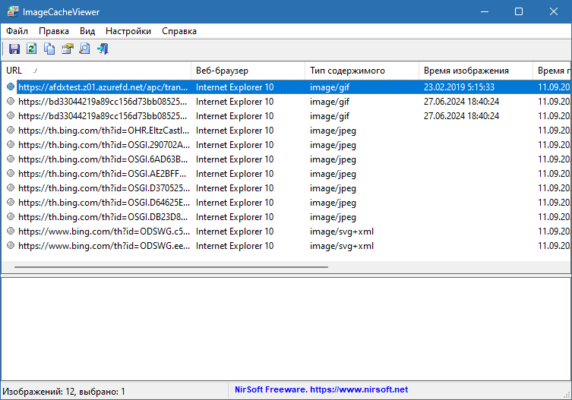
⚙️ Key Features of ImageCacheViewer 1.33
🔍 Automatic Cache Scanning:
Detects and scans image cache folders for all supported browsers automatically.🖥️ Multi-Browser Support:
Works with Chrome, Firefox, Edge, and Internet Explorer seamlessly.🗂️ Detailed Image Info:
Displays the image URL, browser type, cache file location, and access date.💾 Export & Save Options:
Save selected images or export the full cache list to HTML, CSV, or XML formats.⚡ Lightweight & Portable:
No installation required — just download, run, and explore cached images instantly.
🧠 Why Use ImageCacheViewer?
If you’ve ever wanted to recover images from recently visited websites, ImageCacheViewer 1.33 makes the process simple.
It’s useful for:
👨💻 Web developers analyzing image performance
🔎 Investigators reviewing browsing history
🧩 Users recovering lost or deleted online images
Unlike traditional recovery tools, this program focuses specifically on browser image caches, providing faster and more accurate results.
🧾 What’s New in Version 1.33
✅ Updated support for the latest Chrome and Edge cache formats
✅ Improved performance on large browser caches
✅ Fixed minor bugs and optimized cache detection
💻 System Requirements
Operating System: Windows 7, 8, 10, 11
Architecture: 32-bit & 64-bit supported
License: Freeware
Developer: NirSoft
🌐 Official Website
✔ Tested: This software was tested on Windows 10 & Windows 11 and works smoothly without issues.
Frequently Asked Questions
- Is this software free?
Yes, it can be downloaded and used for free. - Does it support Windows 11?
Yes, it works perfectly on Windows 10 and 11. - Is it safe to use?
Yes, the software was scanned and tested before publishing.
Last updated: January 2026