
💻 JP Software CMDebug 33.00.20 – The Ultimate Batch Script Development Environment
JP Software CMDebug 33.00.20 is a professional IDE for developing and debugging batch files and scripts in Windows. Designed by JP Software, CMDebug offers a powerful environment for script creation, testing, and execution—making it an essential tool for developers, system administrators, and automation professionals.
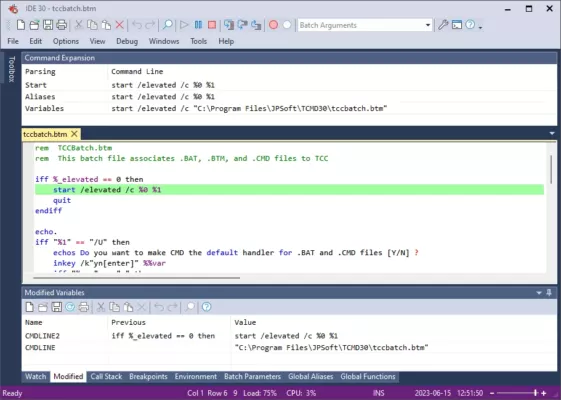
Unlike the traditional Windows Command Prompt, CMDebug provides advanced scripting capabilities, syntax highlighting, debugging tools, and full integration with Take Command, JP Software’s command-line powerhouse.
⚙️ Key Features of CMDebug 33.00.20
🧠 1. Intelligent Script Editor
CMDebug comes with a full-featured IDE (Integrated Development Environment) for writing and editing scripts. It supports syntax highlighting, code folding, auto-completion, and customizable color schemes. Developers can quickly detect errors and optimize their code with real-time feedback.
🧩 2. Batch and TCC Scripting Support
The software supports both standard batch (.BAT, .CMD) files and the enhanced TCC (Take Command Console) scripting language. TCC expands on traditional CMD commands with over 200 new commands, 720+ internal variables and functions, and advanced control structures.
🧰 3. Powerful Debugging Tools
CMDebug includes an integrated debugger that allows you to set breakpoints, step through code line by line, watch variables, and monitor script execution in real time. This helps identify issues quickly and ensures your automation scripts run flawlessly.
⚡ 4. Enhanced Command-Line Interface
With CMDebug, you get a modernized command processor that supports tab completion, command history, color-coded output, and aliases. It’s designed for developers who need more power and flexibility than what the default Windows Command Prompt offers.
🧩 5. Environment Customization
Users can customize their scripting environment with macros, aliases, and function libraries. CMDebug also allows multiple tabbed consoles, making multitasking easier and more organized.
📜 6. Extensive Scripting Language
Beyond standard CMD syntax, CMDebug supports IF/ELSE, DO loops, TRY/CATCH error handling, regular expressions, and file I/O operations—features that bring it closer to modern scripting languages like PowerShell or Bash.
🆕 What’s New in Version 33.00.20
Improved compatibility with Windows 11 (23H2)
Optimized script debugging speed and error reporting
Updated command set with new TCC functions
Enhanced stability and memory management for large scripts
Minor UI refinements and improved syntax highlighting
🖥️ System Requirements
OS: Windows 10 / 11 (32-bit & 64-bit)
CPU: Intel or AMD dual-core processor
RAM: 2 GB minimum (4 GB recommended)
Storage: 200 MB free space
🧠 Why Choose CMDebug?
CMDebug 33.00.20 offers a complete scripting environment that far surpasses the capabilities of the traditional Command Prompt. Whether you’re automating system tasks, writing complex batch jobs, or managing servers, CMDebug simplifies your workflow with powerful debugging and editing tools.
It’s ideal for:
System administrators managing Windows environments
Developers automating repetitive tasks
IT professionals writing custom maintenance scripts
Power users who prefer coding over GUI automation tools
💡 Final Thoughts
If you regularly work with batch files or Windows command scripts, JP Software CMDebug 33.00.20 is a must-have. It provides all the tools you need to write, test, and debug scripts efficiently, while offering unmatched flexibility and control.
CMDebug transforms the way you interact with the Windows command line — turning a simple console into a powerful development workspace.
🔗 Official Website:https://jpsoft.com/cmddebug.html
✔ Tested: This software was tested on Windows 10 & Windows 11 and works smoothly without issues.
Frequently Asked Questions
- Is this software free?
Yes, it can be downloaded and used for free. - Does it support Windows 11?
Yes, it works perfectly on Windows 10 and 11. - Is it safe to use?
Yes, the software was scanned and tested before publishing.
Last updated: January 2026