🎥 4Videosoft Screen Capture 1.5.36 – Professional Screen Recording Made Easy
4Videosoft Screen Capture 1.5.36 is a reliable and high-quality screen recording tool that allows users to capture anything on their computer screen with ease. Whether you need to record gameplay, create tutorial videos, capture online meetings, or save streaming media, this software provides everything you need in a clean and intuitive interface.
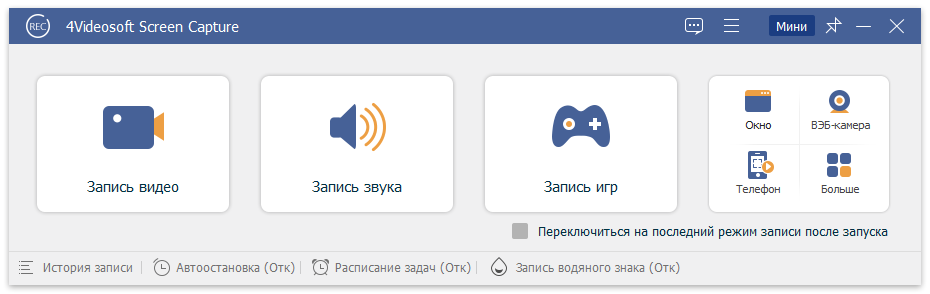
With its advanced recording engine and wide format support, 4Videosoft Screen Capture offers smooth video capture and crystal-clear audio quality—making it perfect for professionals, educators, gamers, and everyday users.
⚡ Key Features
🎬 Record Any Screen Area
Choose full screen, specific windows, or custom regions to record. Perfect for creating tutorials or recording only the important part of your display.🎧 Record System and Microphone Audio
Capture both internal sounds (system audio) and your voice from a microphone. Ideal for podcasts, commentary, and live streaming.📸 Take Screenshots Instantly
Snap high-quality screenshots while recording or separately, and annotate them using built-in drawing tools.📹 Record Webcam and Picture-in-Picture Mode
Add webcam overlays to your recordings for presentations, online teaching, or gameplay videos.🎮 Game Recording Mode
Capture your gameplay smoothly at up to 60 FPS, ensuring no frame drops or lag during recording.🧩 Scheduled Recording
Set start and stop times for automatic recording—perfect for webinars, lectures, or live broadcasts.💾 Multiple Output Formats
Export your recordings in MP4, MOV, WMV, AVI, GIF, and more. Choose the resolution, bitrate, and quality settings that best fit your project.
🆕 What’s New in Version 1.5.36
Improved performance with high-frame-rate video capture.
Enhanced compatibility with Windows 11 and macOS Monterey.
Updated codec support for better file compression and smaller output sizes.
Fixed minor bugs and improved overall stability.
💡 Why Choose 4Videosoft Screen Capture
Unlike many free recorders that come with watermarks or time limits, 4Videosoft Screen Capture offers unlimited recording with professional-grade output. It provides customizable settings, enabling users to balance file size and quality for different needs.
Its simple layout means even beginners can start recording within seconds—just select your screen area, choose audio sources, and hit “Record.”
🌈 Use Cases
Educators: Record online classes, tutorials, and training sessions.
Gamers: Capture gameplay footage with commentary and share it on YouTube or Twitch.
Professionals: Record video conferences, presentations, and webinars for later review.
Content Creators: Create engaging videos with voiceovers, annotations, and webcam footage.
⚙️ System Requirements
OS: Windows 7/8/10/11 or macOS 10.12 and above
Processor: Intel i3 or better
RAM: 2 GB minimum (4 GB recommended)
Disk Space: 200 MB for installation, more for recordings
🔒 Privacy & Reliability
All screen recordings are processed locally on your device—no uploads or online storage—ensuring your data stays private and secure.
🧠 Tips for Best Results
Record in 1080p or 4K for professional-quality output.
Use a noise-cancelling microphone for clearer audio.
Adjust frame rates (30–60 FPS) based on content type.
Save files regularly to avoid data loss during long recordings.
🔗 Official Website
👉 https://www.4videosoft.com/screen-capture/
✔ Tested: This software was tested on Windows 10 & Windows 11 and works smoothly without issues.
Frequently Asked Questions
- Is this software free?
Yes, it can be downloaded and used for free. - Does it support Windows 11?
Yes, it works perfectly on Windows 10 and 11. - Is it safe to use?
Yes, the software was scanned and tested before publishing.
Last updated: January 2026