What Is KeyTweak 2.3.0?
KeyTweak 2.3.0 is a free Windows utility that allows users to remap, disable, or change the function of any keyboard key without editing the system registry manually. It’s ideal for customizing your keyboard layout, fixing broken keys, or optimizing shortcuts for specific software workflows.
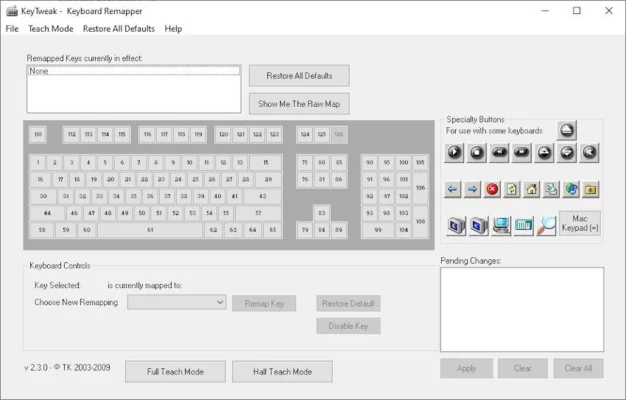
With a simple and intuitive interface, KeyTweak helps users modify how their keyboard behaves at a hardware level. Whether you’re replacing an unused key with a more useful one or disabling a troublesome key altogether, this tool gives you full control.
Why You Might Need KeyTweak
There are many situations where KeyTweak 2.3.0 can make your computing experience more efficient:
- Fix broken or non-functional keys: Remap a broken key to another unused one.
- Improve productivity: Assign frequently used commands to more convenient keys.
- Gaming customization: Configure special key bindings for better control.
- Accessibility enhancement: Simplify your layout to suit your typing style or physical comfort.
Instead of using complex registry edits or third-party scripting tools, KeyTweak simplifies everything with a visual keyboard map.
How KeyTweak 2.3.0 Works
KeyTweak modifies key assignments through the Windows registry scan code map, but it handles all technical details automatically. Here’s how it works:
- Launch the program — it displays a virtual keyboard interface.
- Select the key you want to change.
- Choose its new function from the drop-down menu.
- Click “Remap Key” to confirm.
- Press “Apply” and reboot your computer to activate the changes.
You can also restore the original keyboard layout anytime using the “Restore All Defaults” button.
Key Features of KeyTweak 2.3.0
- User-friendly interface: A virtual keyboard shows key positions clearly.
- Registry-safe operation: No need to edit the Windows registry manually.
- Full key remapping: Reassign or disable any key with ease.
- Partial remapping option: Apply changes only to specific keys.
- Reset feature: Quickly revert all changes to default settings.
- Lightweight and portable: Consumes minimal resources and doesn’t slow down your PC.
It supports all standard Windows keyboards, including multimedia and laptop layouts.
Benefits of Using KeyTweak
- Saves time by eliminating the need for complex configuration files.
- Ideal for both beginners and advanced users.
- Helps extend the life of older keyboards with non-functional keys.
- Perfect for customizing ergonomic setups or gaming controls.
- 100% free and compatible with modern Windows systems.
Final Thoughts
KeyTweak 2.3.0 remains one of the simplest and most effective tools for keyboard remapping on Windows. Its straightforward interface, combined with reliable registry handling, makes it an essential utility for anyone looking to personalize their typing experience.
✔ Tested: This software was tested on Windows 10 & Windows 11 and works smoothly without issues.
Frequently Asked Questions
- Is this software free?
Yes, it can be downloaded and used for free. - Does it support Windows 11?
Yes, it works perfectly on Windows 10 and 11. - Is it safe to use?
Yes, the software was scanned and tested before publishing.
Last updated: January 2026