🧠 Introduction
Libre Hardware Monitor 0.9.4 is a powerful open-source tool that provides detailed monitoring of your computer’s hardware components. Whether you’re a gamer, system administrator, or PC enthusiast, this program helps you track temperatures, voltages, fan speeds, and loads across various hardware sensors in real time. Built on the legacy of the original Open Hardware Monitor, this version offers enhanced compatibility with modern CPUs and GPUs.
⚙️ Key Features of Libre Hardware Monitor 0.9.4
1. Comprehensive Hardware Monitoring
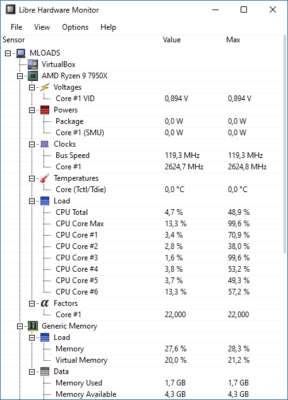
Libre Hardware Monitor can detect and display data from motherboards, CPUs, GPUs, hard drives, and RAM modules. It provides precise readings of temperature, voltage, clock speeds, and power consumption.
2. Support for Modern Hardware
This version offers improved support for Intel Alder Lake, AMD Ryzen, and NVIDIA RTX 40-series GPUs, ensuring compatibility with the latest systems.
3. Real-Time Data Visualization
The software includes dynamic graphs and customizable sensor panels that make it easy to visualize performance metrics. You can watch how your hardware behaves under heavy workloads or idle conditions.
4. Remote Monitoring
Libre Hardware Monitor allows remote access through a built-in web server, enabling you to check your PC’s status from another device using a browser. This is perfect for managing servers or rendering machines.
5. Logging and Reports
You can log sensor data over time for performance analysis and troubleshooting. The exported reports help you identify thermal throttling, failing fans, or overvoltage issues.
💡 Benefits of Using Libre Hardware Monitor
Free and Open Source: No ads, no hidden fees — full transparency and community support.
Lightweight Performance: Uses minimal CPU and memory, making it ideal for background monitoring.
Customizable Interface: Users can choose which sensors to display, set update intervals, and personalize the layout.
Accurate Readings: Regular updates ensure sensor accuracy across diverse hardware configurations.
🧰 How to Use Libre Hardware Monitor 0.9.4
Download and unzip the software package (no installation required).
Run the executable file as administrator.
The program will automatically detect and list all available sensors.
Expand hardware components to view detailed information.
(Optional) Enable “Start with Windows” or configure remote web access for advanced monitoring.
🆕 What’s New in Version 0.9.4
Enhanced support for new Intel and AMD chipsets.
Added NVMe SSD temperature sensors.
Improved GUI responsiveness and graph rendering.
Fixed minor bugs affecting fan speed readings on certain motherboards.
🧩 System Requirements
OS: Windows 7 / 8 / 10 / 11 (64-bit)
RAM: 512 MB minimum
CPU: Intel or AMD processor (x86/x64)
Storage: 50 MB free space
🏁 Conclusion
Libre Hardware Monitor 0.9.4 remains one of the most trusted and versatile hardware monitoring tools for Windows users. Its open-source nature, wide hardware compatibility, and user-friendly design make it a must-have for anyone who wants to keep their PC healthy and efficient. Whether you’re optimizing performance or diagnosing hardware issues, this tool provides the insights you need — completely free of charge.
✔ Tested: This software was tested on Windows 10 & Windows 11 and works smoothly without issues.
Frequently Asked Questions
- Is this software free?
Yes, it can be downloaded and used for free. - Does it support Windows 11?
Yes, it works perfectly on Windows 10 and 11. - Is it safe to use?
Yes, the software was scanned and tested before publishing.
Last updated: January 2026