
Sync Breeze Ultimate 17.3.16 – The Ultimate File Synchronization Solution
Sync Breeze Ultimate 17.3.16 is a powerful file synchronization software designed to help users manage, mirror, and back up files efficiently across multiple locations. Whether you’re syncing data between drives, NAS servers, or network folders, Sync Breeze provides unmatched speed and accuracy.
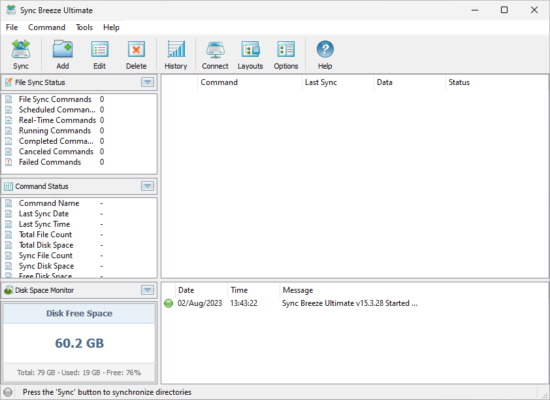
Developed by Flexense Ltd, this professional-grade tool is trusted by system administrators, IT departments, and business users worldwide. It offers a combination of automation, customization, and performance, making it ideal for handling large-scale data synchronization tasks.
Key Features of Sync Breeze Ultimate 17.3.16
High-Speed File Synchronization
Sync Breeze uses advanced algorithms to compare and synchronize files at lightning speed. It supports both one-way and two-way synchronization, ensuring that your data stays consistent across all devices and servers.
Real-Time File Monitoring
The software can monitor specific directories and automatically synchronize them whenever a change occurs. This feature is perfect for users who want to keep their backups continuously up to date without manual intervention.
Advanced Scheduling Options
With built-in scheduling tools, you can set automatic synchronization tasks daily, weekly, or monthly. Sync Breeze runs these operations in the background, ensuring your data stays secure and updated.
Detailed Reports and Logs
After each operation, Sync Breeze generates detailed reports showing the number of files synchronized, transferred size, and any detected issues. This transparency makes it easy to audit synchronization processes.
Multi-Platform and Network Support
Sync Breeze Ultimate supports local disks, external drives, NAS storage, and network shares. It’s also compatible with most file systems, making it versatile for both personal and enterprise use.
What’s New in Sync Breeze Ultimate 17.3.16
The 17.3.16 release introduces several performance enhancements and new capabilities:
Faster synchronization speed for large file sets.
Improved error handling for network drives.
Enhanced compatibility with Windows 11 and modern NAS systems.
New command-line options for automation and scripting.
Updated user interface with better real-time feedback and progress tracking.
These improvements make the software even more efficient and user-friendly for managing complex file operations.
Why Choose Sync Breeze Ultimate 17.3.16
Sync Breeze stands out because of its balance between simplicity and power. It allows you to synchronize terabytes of data with minimal configuration while maintaining full control over filters, rules, and automation triggers.
Whether you’re backing up critical business data or mirroring personal files across multiple locations, Sync Breeze ensures accuracy, reliability, and flexibility. Its real-time monitoring and scheduling make it an indispensable tool for both professionals and home users.
How to Use Sync Breeze Ultimate Effectively
Step 1: Create a Sync Task
Open Sync Breeze, click “Add Task,” and select the source and destination directories.
Step 2: Choose Sync Mode
Select one-way or two-way synchronization, depending on whether you want to mirror or update both locations.
Step 3: Automate the Process
Enable scheduling or real-time sync to keep your folders continuously updated. You can also export reports for documentation or audits.
Final Thoughts
Sync Breeze Ultimate 17.3.16 delivers fast, reliable, and customizable file synchronization for users who value performance and efficiency. Its automation tools, real-time monitoring, and scalability make it ideal for everything from personal file management to enterprise-level data operations.
If you’re looking for a powerful, secure, and easy-to-use synchronization tool, Sync Breeze Ultimate 17.3.16 is one of the best choices available today.
✔ Tested: This software was tested on Windows 10 & Windows 11 and works smoothly without issues.
Frequently Asked Questions
- Is this software free?
Yes, it can be downloaded and used for free. - Does it support Windows 11?
Yes, it works perfectly on Windows 10 and 11. - Is it safe to use?
Yes, the software was scanned and tested before publishing.
Last updated: January 2026