
Overview of DeadLock 1.4.0.0
DeadLock 1.4.0.0 is a lightweight and powerful utility designed to help users unlock files and folders that are locked by the Windows operating system or other running processes. When Windows refuses to delete, move, or rename a file because it’s “in use,” DeadLock steps in to solve the problem instantly.
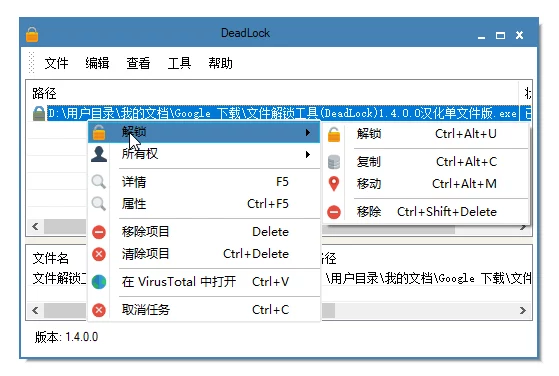
Developed by CodeDead, this tool is a must-have for power users and IT professionals who frequently deal with stubborn files that cannot be accessed normally. It integrates seamlessly with Windows Explorer, allowing quick access through right-click context menus.
Key Features
Unlock Locked Files Instantly
DeadLock allows users to unlock any file that is locked by system processes, background services, or applications. By analyzing which processes are using the file, it gives you the option to close the handle safely or forcefully, restoring full control over your files.
Move, Delete, or Rename Files Easily
Once a file is unlocked, DeadLock provides quick options to delete, rename, or move it without needing to reboot your system. This makes it ideal for cleaning up unwanted temporary files, old installations, or malware remnants.
Integration with Windows Explorer
The program integrates directly into the Windows right-click menu, enabling one-click access to unlock or manage files. This feature saves time and effort, making it easy to handle locked files without opening the full application each time.
Modern and Intuitive Interface
DeadLock 1.4.0.0 features a clean, modern interface that’s simple for both beginners and advanced users. The drag-and-drop functionality allows users to quickly add locked files to the interface for immediate action.
Detailed Process Information
For each locked file, DeadLock provides detailed information about which processes or system services are responsible. This transparency helps users understand what’s causing the lock and decide whether it’s safe to terminate the process.
Benefits of Using DeadLock
Save Time and Avoid Reboots
Traditional file management on Windows often requires restarting the system to remove locked files. DeadLock eliminates that hassle by unlocking files in real time, saving you valuable time.
Enhanced File Control
Whether it’s a log file, installer residue, or system-generated temporary file, DeadLock gives you full authority over your data. You can delete files that Windows won’t let you touch — all with just a few clicks.
Safe Unlocking Mode
The program includes a “safe unlock” option that minimizes the risk of damaging active system processes. This ensures your system stability while still allowing you to regain access to locked items.
Portable and Lightweight
DeadLock is small in size, requires no complex installation, and can even run as a portable app. This makes it a perfect companion for technicians who manage multiple systems.
Conclusion
DeadLock 1.4.0.0 is one of the most reliable tools for unlocking and managing locked files on Windows. Its combination of simplicity, performance, and flexibility makes it a top choice for both casual users and IT professionals.
If you’re dealing with files that won’t delete, move, or rename, DeadLock is the perfect solution — fast, efficient, and completely free to use.
✔ Tested: This software was tested on Windows 10 & Windows 11 and works smoothly without issues.
Frequently Asked Questions
- Is this software free?
Yes, it can be downloaded and used for free. - Does it support Windows 11?
Yes, it works perfectly on Windows 10 and 11. - Is it safe to use?
Yes, the software was scanned and tested before publishing.
Last updated: January 2026