
Overview of Wifinian 3.7.1
Wifinian 3.7.1 is a lightweight and efficient Wi-Fi network manager designed for Windows users who want more control over their wireless connections.
Unlike the built-in Windows Wi-Fi settings, Wifinian provides advanced options to connect, rename, reorder, and auto-connect to networks with just a few clicks.
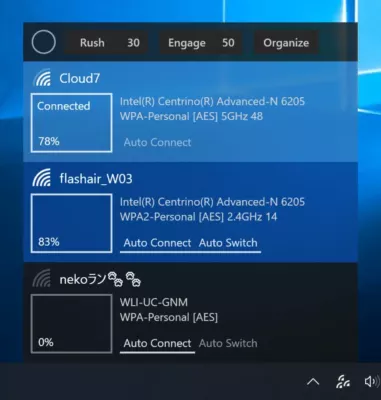
This version brings smoother performance, improved user interface elements, and enhanced compatibility with Windows 11.
Key Features
1. Real-Time Wi-Fi Control
Wifinian allows you to manage all available wireless networks directly from its small, modern window. You can connect to or disconnect from networks instantly without navigating through Windows settings.
2. Reorder and Prioritize Networks
One of the most useful features in Wifinian is the ability to prioritize Wi-Fi connections. You can easily reorder saved networks to control which one your PC connects to first — ideal for users who frequently switch between home, office, and mobile hotspots.
3. Auto-Connect and Auto-Rename
The Auto Connect feature lets you automatically join preferred networks as soon as they are in range. You can also rename Wi-Fi profiles to make them easier to identify, a handy feature for environments with many networks using similar SSIDs.
4. Refresh and Rescan
With just one click, Wifinian rescans all available networks, showing signal strength, security type, and connection status. The real-time refresh ensures you always see the most accurate list of nearby connections.
How It Works
Step 1: Launch Wifinian
After installation, open the application. It will immediately display all available Wi-Fi networks and saved profiles.
Step 2: Manage Connections
Click a network to connect or disconnect. The tool displays useful details such as signal strength, network type, and security status.
Step 3: Adjust Priority
Use the reorder function to move your preferred network to the top of the list. Wifinian will automatically connect to it when available.
What’s New in Version 3.7.1
Improved Wi-Fi refresh speed and stability
Enhanced network prioritization performance
Fixed bugs with Windows 11 connectivity
Updated interface for smoother navigation
Reduced background memory usage
Performance and Compatibility
Wifinian 3.7.1 is fully compatible with Windows 10 and Windows 11.
The application is very lightweight — it uses minimal CPU and memory, making it perfect for laptops and low-power devices.
It runs quietly in the background and can be accessed quickly from the system tray, ensuring quick network switching anytime.
Pros and Cons
Pros
Simple and fast Wi-Fi management
Customizable connection priority
Auto-connect and rename features
Modern, minimal interface
Cons
No scheduling or automation options
Windows-only software
Conclusion
Wifinian 3.7.1 is an excellent utility for anyone who wants full control over their Wi-Fi connections.
It’s faster, simpler, and more flexible than Windows’ default network tools, allowing users to manage wireless connections efficiently.
Whether you’re a power user who switches between multiple access points or just want your computer to always connect to the strongest signal, Wifinian offers an elegant and practical solution.
✔ Tested: This software was tested on Windows 10 & Windows 11 and works smoothly without issues.
Frequently Asked Questions
- Is this software free?
Yes, it can be downloaded and used for free. - Does it support Windows 11?
Yes, it works perfectly on Windows 10 and 11. - Is it safe to use?
Yes, the software was scanned and tested before publishing.
Last updated: January 2026